Home Overview
The Home page is your main dashboard - the first thing you see when logging into Business App. It provides an at-a-glance view of your business performance and quick access to key features.
What you'll see
- AI work and recommendations: The work your AI has already completed, recommended next steps, and products you can add — see Your AI's work on the Home page
- Key Metrics: Performance data organized into Impressions, Engagement, and Leads
- My Meetings card: Appointment activity, AI booking performance, and calendar health (visible once Meeting Scheduler is active)
- Recent Activity: Live feed of messages, calls, and customer interactions
- Business Profile: Quick access to your location info and profile management
- Products & Services: Available offerings and store integration
- Get Started Guide: Setup assistance if you're new to Business App
Marketing Funnel
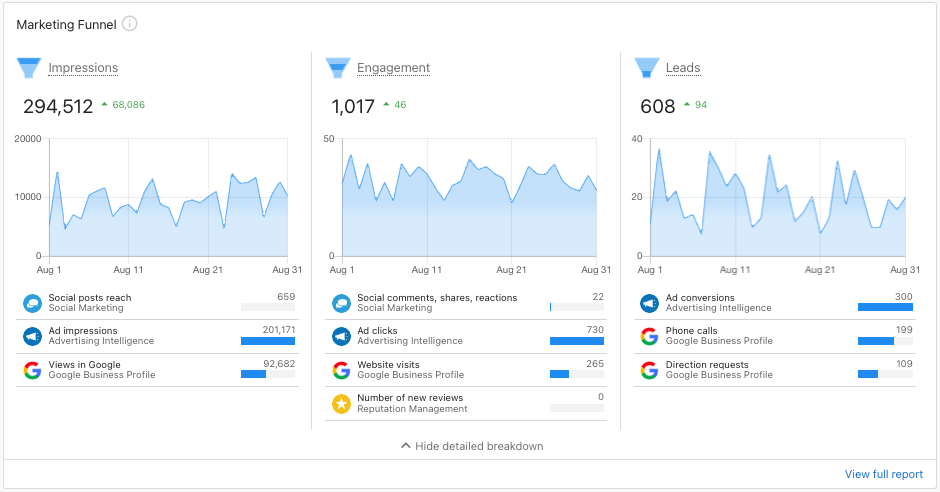
The Marketing Funnel displays key metrics in three easy-to-understand categories, helping you see how your marketing efforts drive business results.
How it works
The Marketing Funnel organizes performance data into:
- Impressions: Views of your online content (Google Business Profile views, social media reach)
- Engagement: Interactions with your business content (website visits, reviews, calls)
- Leads: New prospects from multiple sources (phone calls, SMS, forms, automations)
This gives you a clear view of your marketing performance without needing to dig into detailed reports.
My Meetings card
Below the Marketing Funnel, the My Meetings card shows your appointment activity for accounts with the Meeting Scheduler product active.
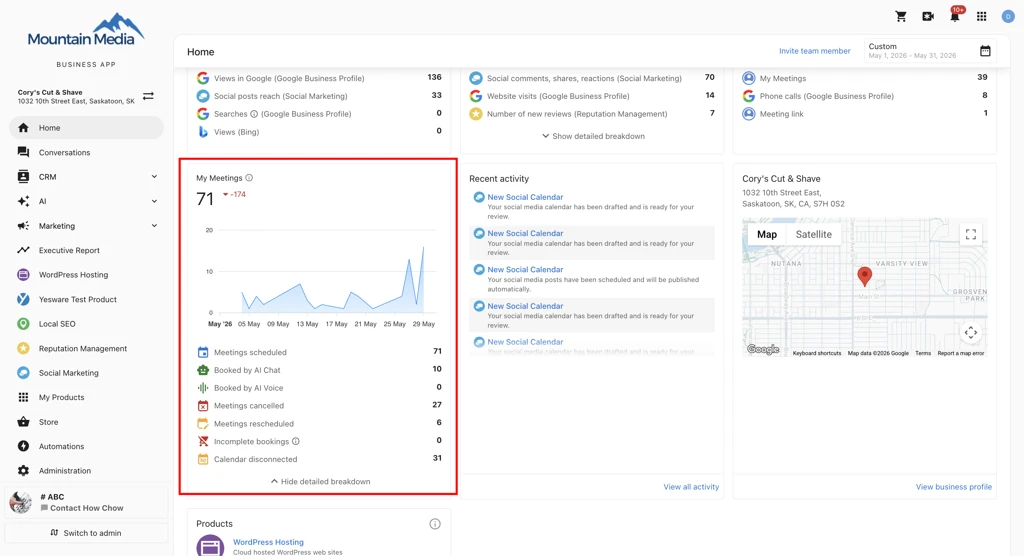
The card shows:
- Total meetings scheduled for the selected date range, with a delta badge showing the change from the prior period.
- AI booking attribution — a breakdown of bookings from AI Chat, AI Voice, and other sources.
- Calendar disconnect signal — a count of any host calendars that have been disconnected, so you can reconnect them before it affects bookings.
Click Show detailed breakdown to expand Cancelled, Rescheduled, and Total Incomplete Bookings. Metric rows with a value of 0 aren't shown, so the card only surfaces signals that are active on your account.
The card appears automatically once the Meeting Scheduler product is active on your account — no additional setup is required. These metrics also appear in your Executive Report.
Invite team member
You can invite additional team members to access your Business App account.
How to invite a team member
- Log into
Business App. - From the
Home page, selectInvite Team Memberon the top right of the page. - Enter the first name, last name, and email address of the team member you want to invite.
- Click
Send Invite.
The invited team member will receive an email with instructions to join and access the Business App account.
Related
- Your AI's work on the Home page - The AI work summary, recommended next steps, and product cards
- Get Started - Complete guide to Business App setup and features