Manage Backups
The WordPress Hosting dashboard offers a robust backup system, empowering users to protect their digital assets efficiently. This article covers the mechanics of creating backups from the WordPress Hosting dashboard, highlighting its importance and providing a straightforward, step-by-step guide.
How Automated and Manual Backups Work: The WordPress Hosting dashboard is equipped with a dual-layered backup system for unparalleled security:
Automated Daily Backups: The platform creates backups for all websites on a daily basis, ensuring that your latest updates are safeguarded without requiring manual intervention. Manual Backup Capability: For instances where immediate backup is crucial, users have the flexibility to generate backups at any time, providing an additional layer of control and peace of mind. Backup Retention Policy: The platform offers tiered backup retention periods:
- WordPress Hosting Pro Accounts: Backups are retained for 30 days, plus 2 on-demand downloadable backups.
- WordPress Hosting Premium (Multisite) Accounts: Backups are retained for 30 days, plus 3 on-demand downloadable backups.
- WordPress Hosting Standard Accounts: Only the most recent daily backup is available.
How does it work?
You can create a new backup of your live site at any time from the Backups tab. Click on the Backups Tab. Click on Create a new backup from Production or Backup Now to create a backup of the live/production site.
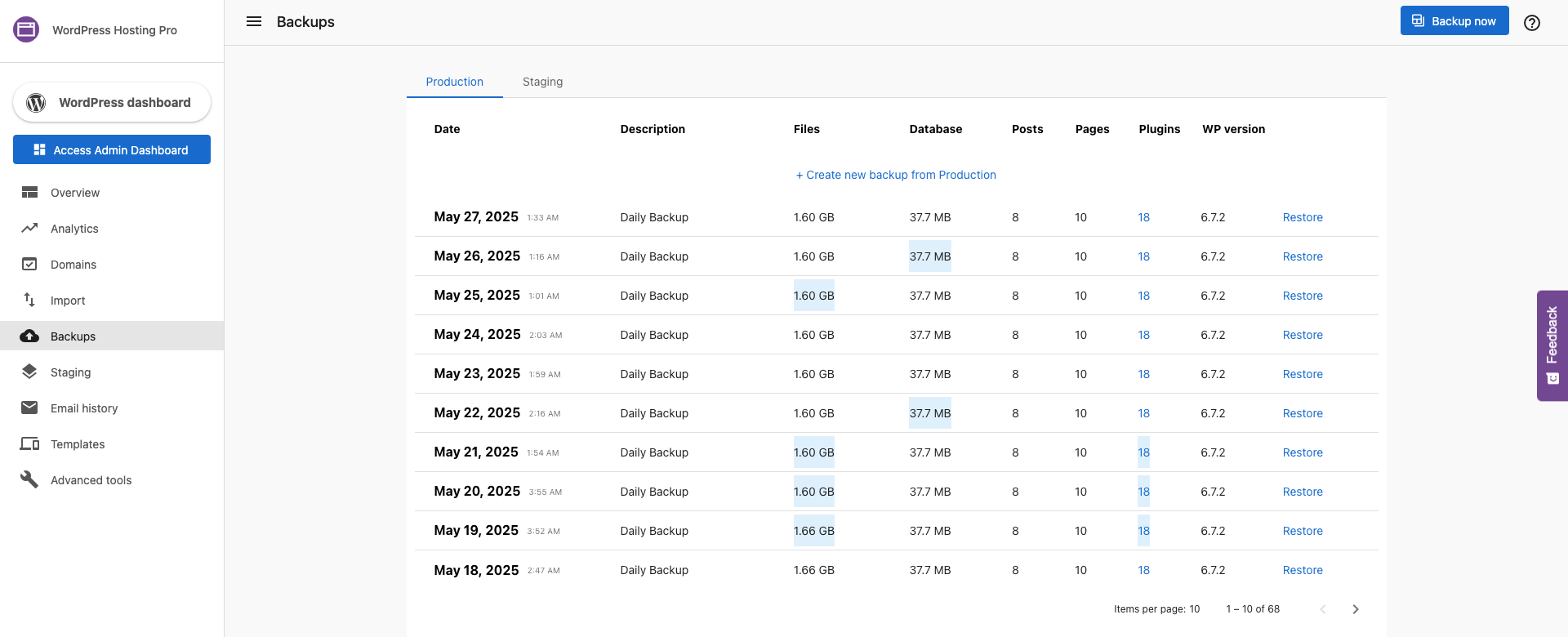
Initiate the Backup Process: Within the Backups Tab, you will have two primary options:
- Backup Now: Instantly generates a backup of your live/production site, ensuring any recent changes are secured.
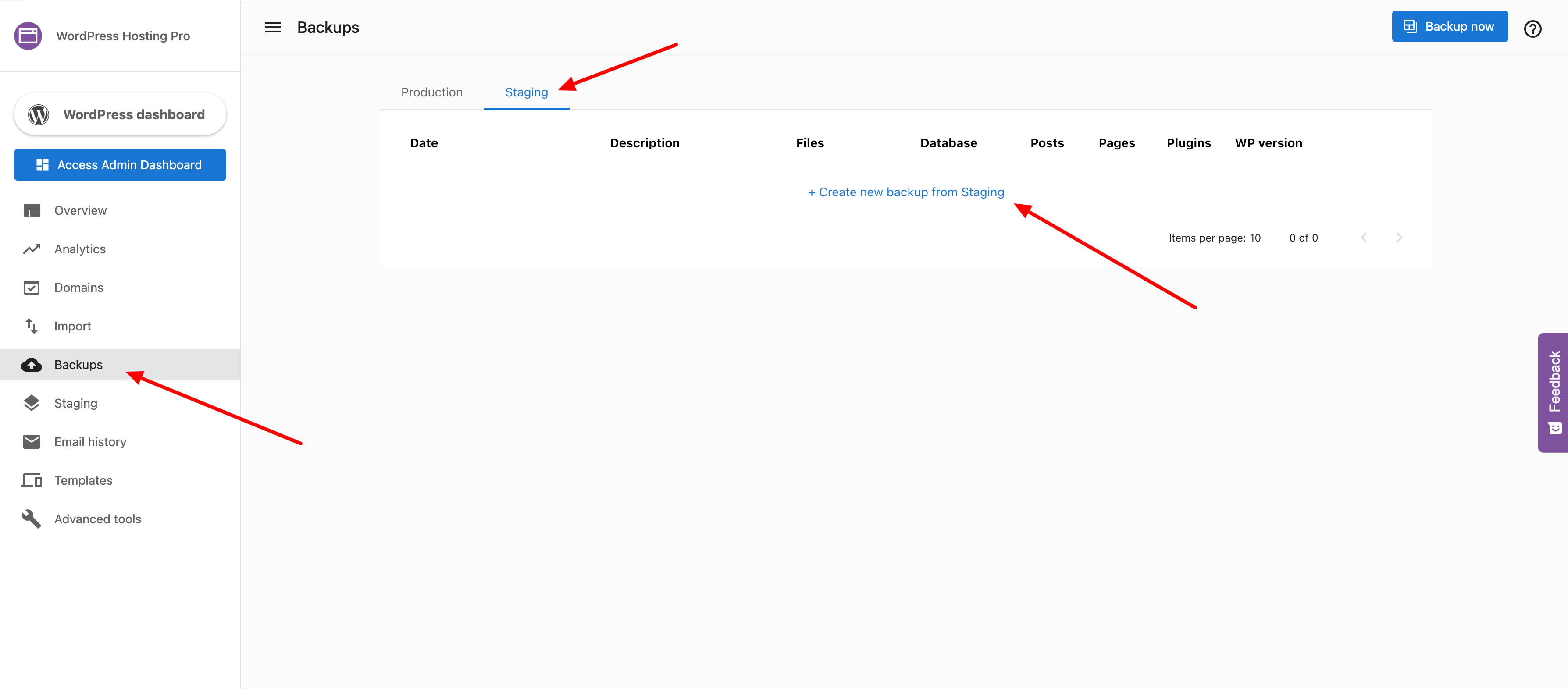
Creating a backup from staging
You can also create a new backup of your staging site at any time from the Backups tab.
Frequently Asked Questions (FAQs)
How long does a restoration take?
Restoration time depends on the size of your site. Small sites may restore in minutes, while larger sites (multiple GBs) can take significantly longer.
Does WordPress Hosting provide automated daily backups? How long are they kept?
Yes. All WordPress Hosting Pro and Standard sites are backed up daily, and users can also create manual backups at any time.
Backup retention:
- WordPress Hosting Pro: Backups are retained for 30 days, plus 2 on-demand downloadable backups
- WordPress Hosting Premium (Multisite): Backups are retained for 30 days, plus 3 on-demand downloadable backups
- WordPress Hosting Standard: Only the most recent daily backup is available
You can view and restore backups at any time from the Backups tab in the WordPress Hosting dashboard.
Manual backups are especially useful before major site updates, staging deployments, or plugin/theme changes.
What happens if I cancel a WordPress Hosting product?
If a WordPress Hosting product (Standard or Pro) is canceled and fully deactivated:
- Both the production and staging sites are taken offline immediately
- The site will return a "site not found" error to visitors
- Backups stop being created from the moment of cancellation
For WordPress Hosting Pro users:
- If the product is reactivated within 90 days, the site can be restored in the exact state it was in when canceled
- After 90 days, the system will create a final archive, and then both the production and staging sites will be permanently deleted
Tip: If you're planning to cancel but may return later, reach out to Support before canceling. We can help you obtain a final copy of the website.
Will I receive notifications if a backup fails?
No, not at this time. WordPress Hosting does not currently send failure notifications for daily or manual backups.
We recommend:
- Regularly checking the Backups tab in the WordPress Hosting dashboard
- Reviewing backup history to confirm recent versions are available and secure
- Performing manual backups before major edits or plugin installations
How does WordPress Hosting protect my sites from DoS attacks?
WordPress Hosting leverages Google Cloud Platform's infrastructure-level DDoS protection, along with additional platform measures:
- Rate limiting on high-volume requests (20 requests per second limit, with 20 extra requests burst buffer)
- Protection of the WordPress login system:
- The default
wp-login.phppage is not directly accessible - Admins must sign in through the secure dashboard
- This protects against brute-force login attacks and credential stuffing
- The default
Together, these safeguards help ensure your sites remain fast, secure, and available—even during high traffic or threat events.
Does WordPress Hosting use server-side rate limiting?
Yes. WordPress Hosting applies IP-based rate limiting to reduce the risk of abuse, bots, and DDoS attacks.
Rate Limit Configuration:
- Limit: 20 requests per second
- Burst buffer: 20 extra requests (i.e., 40 total max in 1 second)
- Requests beyond this are rejected with a 429 Too Many Requests response
Exemptions (not rate-limited):
- Static assets (images, JS, CSS)
- PHP GET requests
- AJAX requests via
wp-admin/admin-ajax.php
This ensures that normal traffic is unaffected while malicious requests are filtered.
Can I disable the server signature from the NGINX Server Header in WordPress Hosting?
No, the server signature cannot be fully disabled in WordPress Hosting.
Why? The NGINX server signature masks specific server and version details to enhance security. It's a global configuration and not customizable per site.
Disabling it would only result in default information being shown — which is essential for troubleshooting and internal diagnostics. For this reason, WordPress Hosting does not support removing or editing the server signature header.
Is WordPress Hosting HIPAA or GDPR compliant?
No. WordPress Hosting is not fully compliant with HIPAA or GDPR regulations at this time.
Why not? While cookie banners and consent tools can be added, full compliance — such as guaranteed data deletion or protected health information (PHI) handling — involves multiple systems beyond just the website backend. The platform cannot guarantee total control or deletion of all user data submitted via form fills.
If you require HIPAA or GDPR compliance, you may need to explore more specialized hosting or form-handling platforms.