Real-time performance notifications
Stay informed about your website's status with real-time notifications, so you can quickly resolve issues and maintain exceptional performance.
What are real-time performance notifications?
Real-time performance notifications provide enhanced visibility into your website's status by sending alerts the moment there is a change in your site's availability.
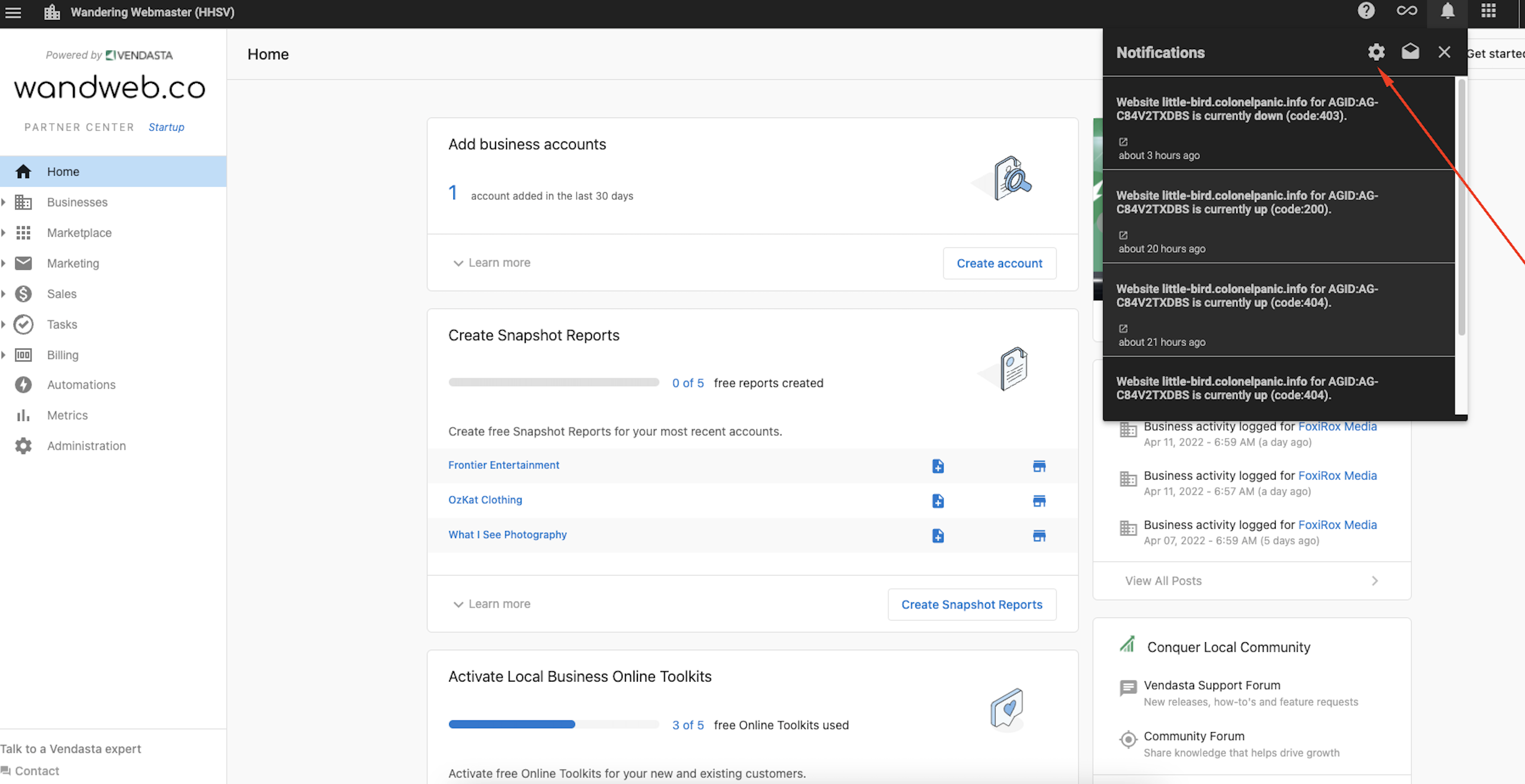
You can opt-in to receive in-app or email notifications to be notified in real-time in the event of unplanned downtime, and the moment the service is restored.
Why are real-time notifications important?
Stay Informed: Downtime impacts your business. Real-time notifications help you monitor your website's status and act quickly with accurate, timely information.
Proactive Response: Instead of waiting to discover that your website is down, notifications allow you to proactively respond to issues before visitors or customers are affected.
How do real-time notifications work?
- The client's website is pinged every 30 minutes
- If the ping is successful, no action is taken
- If there is an unsuccessful ping, a notification is sent based on your preferred notification settings (in-app and or email)
- Notification is sent on a status change only (for example, if a website in-service goes offline suddenly or vice versa for a restored website)
- Notification is only sent once until another change of state
How to activate notifications
Notifications can be enabled in three easy steps:
1. Click on the notifications bell in your dashboard.

2. Click on the gear icon that takes you to the settings

3. Scroll down to the website section to enable notifications
