Advanced reporting of individual campaign metrics
With the Advanced Reporting add-on, you can view detailed metrics of your individual advertising campaigns.
Advanced Reporting displays detailed metrics such as engagement and conversions for each ad campaign. Use this information to gain insight into how your campaigns are performing and learn more about your audience, your product or service sales, and your campaign's reach. With this data, make more informed decisions when building your campaigns and improve your results for future campaigns.
How does it work?
- Go to
Advertising Intelligence→Overview. - With either a Google Ads or Facebook Ads account connected, see your active campaigns listed below the summary of all metrics. Click the campaign you want to view detailed campaign statistics for.
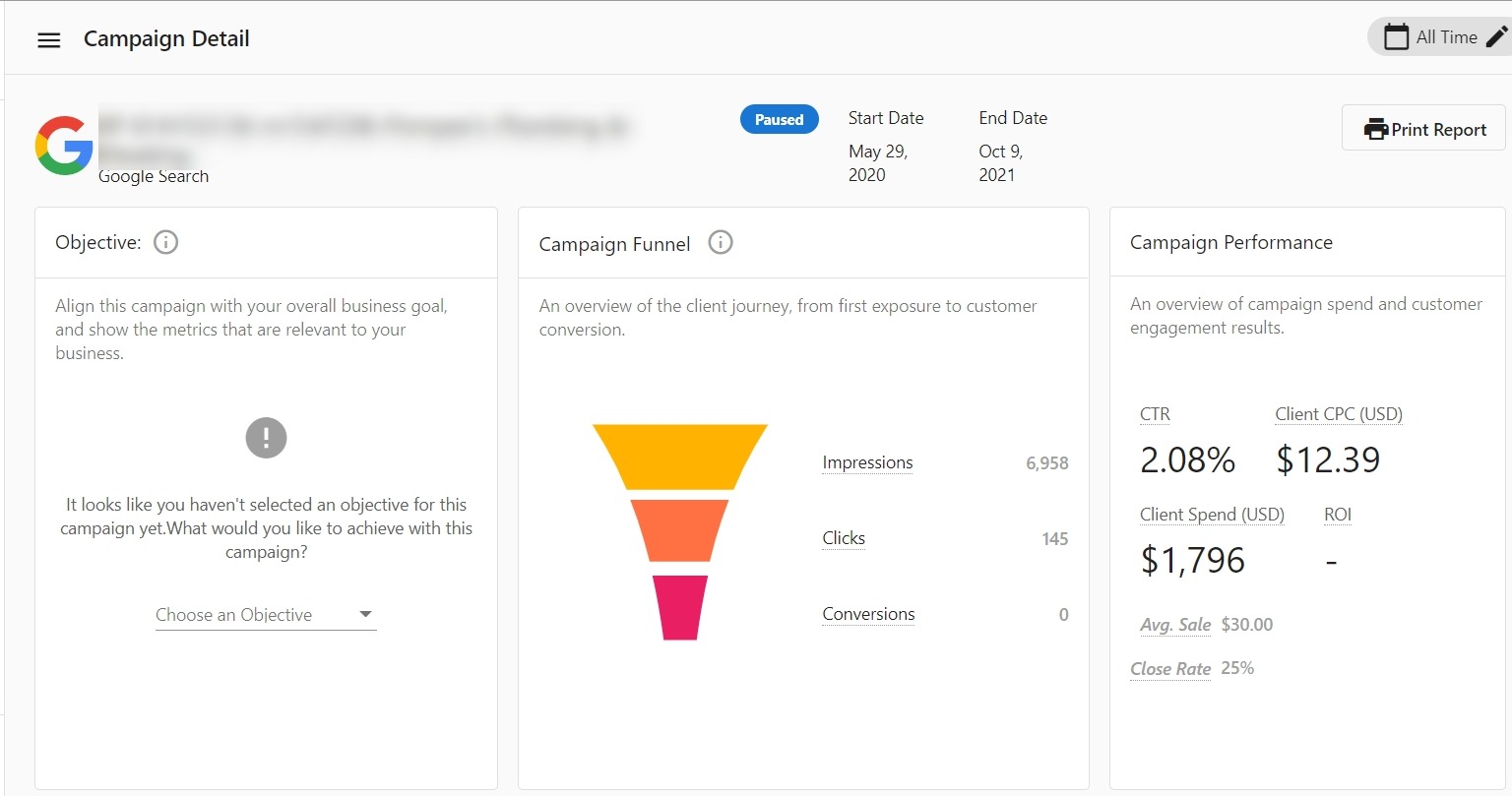
- This takes you to the campaign details page where you can view your
Campaign Objectiveand aCampaign Funnelhighlighting the user journey from first exposure to the ad to customer conversion. You'll also see detailed metrics of yourCampaign Performancereporting on your campaign investment and customer engagement results. - If you haven't set an objective yet, click
Set Campaign Objectiveto select your main goal for the campaign. For Facebook Ad accounts, the objective set up during campaign creation is imported. For Google Ad accounts, the objective can't be imported and you can set the appropriate objectives in the product. You can also use this button to edit yourCampaign Objectiveto prioritize the metrics that align with your current business goal. Any updates made here don't affect your external Ads account information. - Below the Campaign Metrics, view the Ads Table showing statistics for each specific Ad Creative within that campaign. This feature works for both Google Ads and Facebook Ads.
If you don't have Advanced Reporting activated, you can purchase this add-on by selecting the Purchase Advanced Reporting button in the Advertising Intelligence dashboard.
This feature requires the Advanced Reporting add-on.