How do I register my US business for SMS?
US phone carriers require your business to complete A2P 10DLC registration before you can send SMS messages from Business App. Register at Administration > Conversations Settings > Phone & SMS with your legal business name, EIN, and a compliant website.
A2P 10DLC (Application-to-Person 10-Digit Long Code) registration verifies your business identity and confirms that your website meets carrier compliance standards. Without an approved registration, your business cannot send or receive SMS messages through US phone numbers.
For a working example of a compliant website, see the sample website which includes a privacy policy, terms of service, and web form that meet all carrier requirements.
This registration is only required for businesses located in the United States. Canadian businesses can use SMS messaging immediately without registration.
What do I need before I register?
Before you start the registration form, confirm that every item below is in place. Each item links to the detailed section further down this page.
- Your legal business name and EIN exactly match your IRS records (details)
- Your website has a privacy policy page with the required SMS data-handling language (details)
- Your website has a terms and conditions page describing your SMS program (details)
- Every web form that collects phone numbers has separate opt-in checkboxes for transactional and marketing messaging (details)
- Your opt-in checkboxes link to your privacy policy and terms and conditions (details)
- Your business does not fall into a prohibited or high-scrutiny category
On the review step of the registration form, click Check with AI to have the AI Verification assistant check your entry. It reviews your campaign details together with the pages you linked — your privacy policy, terms of service, and any opt-in or contact forms — and flags issues by severity with the specific fix for each one. This check is optional and does not prevent you from submitting.
What brand information do I need?
The registration form collects two types of information: Brand and Campaign.
Brand represents your business identity — your legal business name, EIN/Tax ID, address, industry, and an authorized representative. Brand information is verified against government databases, so it must exactly match the information the IRS has on file. Your brand only needs to be registered once.
Campaign describes how your business uses SMS messaging. Every campaign covers both transactional and marketing messages, and includes how you collect customer consent along with links to your privacy policy and terms and conditions.
EIN requirements
An Employer Identification Number (EIN) is a nine-digit number the IRS assigns to your business. You can find your EIN on:
- Your IRS CP 575 EIN Confirmation Letter
- Previous tax returns
- Bank account documents
If you do not have an EIN, you can apply for one by submitting IRS Form SS-4 online.
If your EIN was issued within the last 90 days, it may not appear in verification databases yet. Check the date on your CP 575 letter — if fewer than 90 days have passed, wait before submitting your registration.
What must my privacy policy include?
Your registration requires a link to a privacy policy that is publicly accessible on your website. The privacy policy must describe how your business handles customer data in the context of SMS messaging.
Required language
Your privacy policy must include all of the following:
| Requirement | Language to include |
|---|---|
| No sharing of SMS data | Text messaging originator opt-in data and consent will not be shared with any third parties, excluding aggregators and providers of the text message services. |
| Opt-in disclosure | By providing your number, you consent to receive automated informational and promotional messages. |
| Opt-out instructions | You can cancel the SMS service at any time. Just text "STOP" to our number. We will send a confirmation message to acknowledge your request. |
| Help instructions | Reply HELP for assistance. |
| Rates | Message and data rates may apply. Message frequency varies. |
Your privacy policy must also state:
- What types of messages customers may receive (e.g., appointment reminders, promotional offers)
- How customer data is stored and protected
- How customers can request their data be deleted
What to avoid
Do not include any of the following in your privacy policy:
- References to SMS messaging from a different business or brand
- Language that grants blanket permission to share customer phone numbers with unrelated third parties
- Outdated or placeholder text that does not reflect your actual data practices
The URL you provide must link directly to the privacy policy page — not to a homepage or a general legal page.
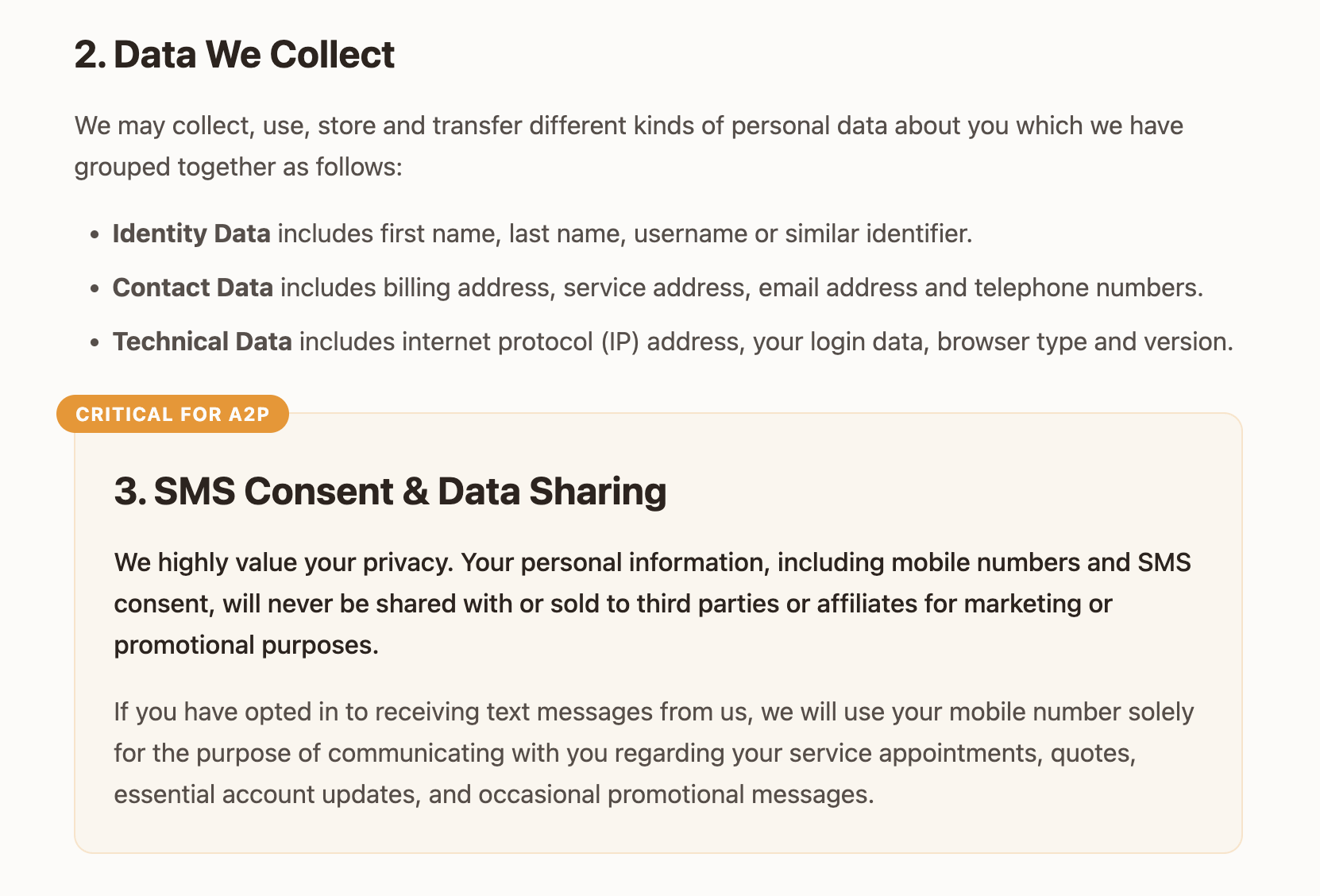
Example: The following screenshot shows a compliant privacy policy with the required SMS language.
What must my terms and conditions include?
Your registration requires a link to terms and conditions that are publicly accessible on your website. The terms must cover your SMS messaging program.
Required language
Your terms and conditions must include all of the following:
| Requirement | Language to include |
|---|---|
| Program description | By opting in, you agree to receive [Your Business Name] notifications and alerts. |
| Standard phrases | Message and data rates may apply. Message frequency varies. Carriers are not liable for delayed or undelivered messages. |
| SMS instructions | Text HELP for help or STOP to cancel. |
Your terms must also include:
- A description of what messages customers will receive
- Your business contact information
What to avoid
Do not include any of the following in your terms and conditions:
- Language that prevents customers from opting out of messages
- Terms that contradict standard carrier opt-out mechanisms (STOP/HELP keywords)
- Outdated terms referencing a messaging program your business no longer operates
The URL must link directly to the terms and conditions page.
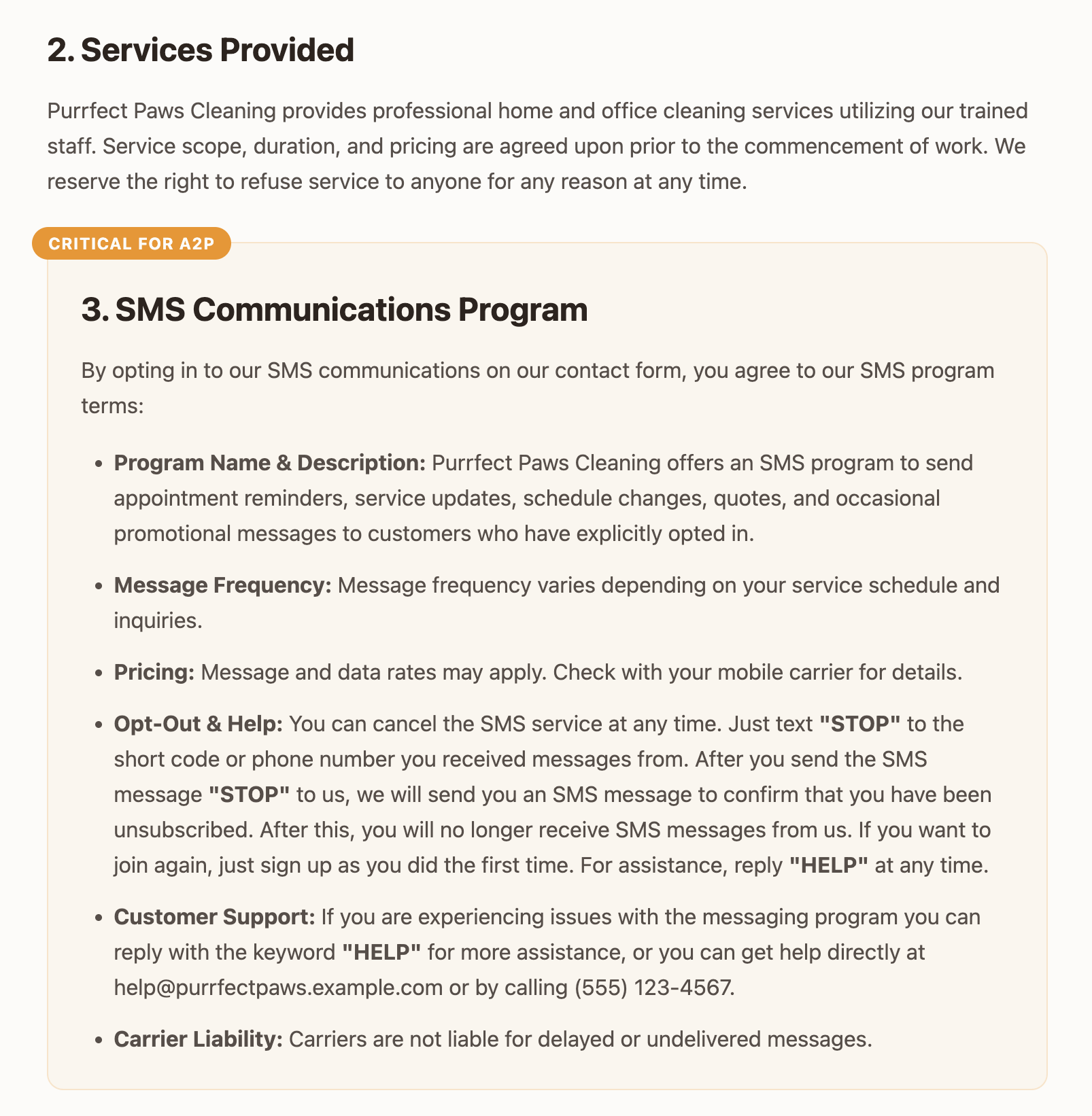
Example: The following screenshot shows compliant terms of service with the required SMS program section.
How do I collect SMS consent?
Phone carriers require proof that your business collects consent from customers before sending them SMS messages.
Consent on your web form
If your business collects customer information through a web form on your website, the form must include separate consent checkboxes for transactional and marketing messaging:
- Transactional consent: Confirms the customer agrees to receive service-related messages such as appointment reminders and support updates.
- Marketing consent: Confirms the customer agrees to receive promotional messages such as sales and special offers.
Neither consent checkbox must be required to complete the form. Customers must be able to submit the form without opting into any SMS messaging.
Checkbox requirements:
- Place a checkbox next to the phone field on every website form
- The checkbox must be unchecked by default
- Both checkboxes must state that message and data rates may apply, message frequency varies, and that the customer can reply STOP to unsubscribe or HELP for assistance
- Both checkboxes must include links to your privacy policy and terms and conditions
Common mistakes that cause rejections:
Carriers reject registrations when the form implies that consent is granted automatically or required to submit, even when both checkboxes are present and correctly worded. Watch for:
- A statement near the checkboxes or the submit button such as "By clicking Submit, you agree to receive marketing communications." This tells carriers that consent comes from submitting the form rather than from the customer's own choice, which contradicts the checkboxes.
- Consent language placed in the form's introduction or fine print instead of in the checkbox labels
- A single checkbox covering both transactional and marketing messaging
- Wording that suggests the customer has to opt in to continue, such as marking a checkbox "required"
The checkboxes must be the only place a customer gives consent. A customer who leaves both unchecked must still be able to submit the form, and must not receive any SMS messages.
Example checkbox text:
Transactional: "I agree to receive text messages from [Your Business Name] regarding appointment reminders, quotes, or service updates. Message frequency varies. Message and data rates may apply. Reply STOP to cancel, HELP for help. See our [Privacy Policy] and [Terms of Service]."
Marketing: "I agree to receive occasional promotional messages from [Your Business Name]. Message frequency varies. Message and data rates may apply. Reply STOP to cancel, HELP for help. See our [Privacy Policy] and [Terms of Service]."
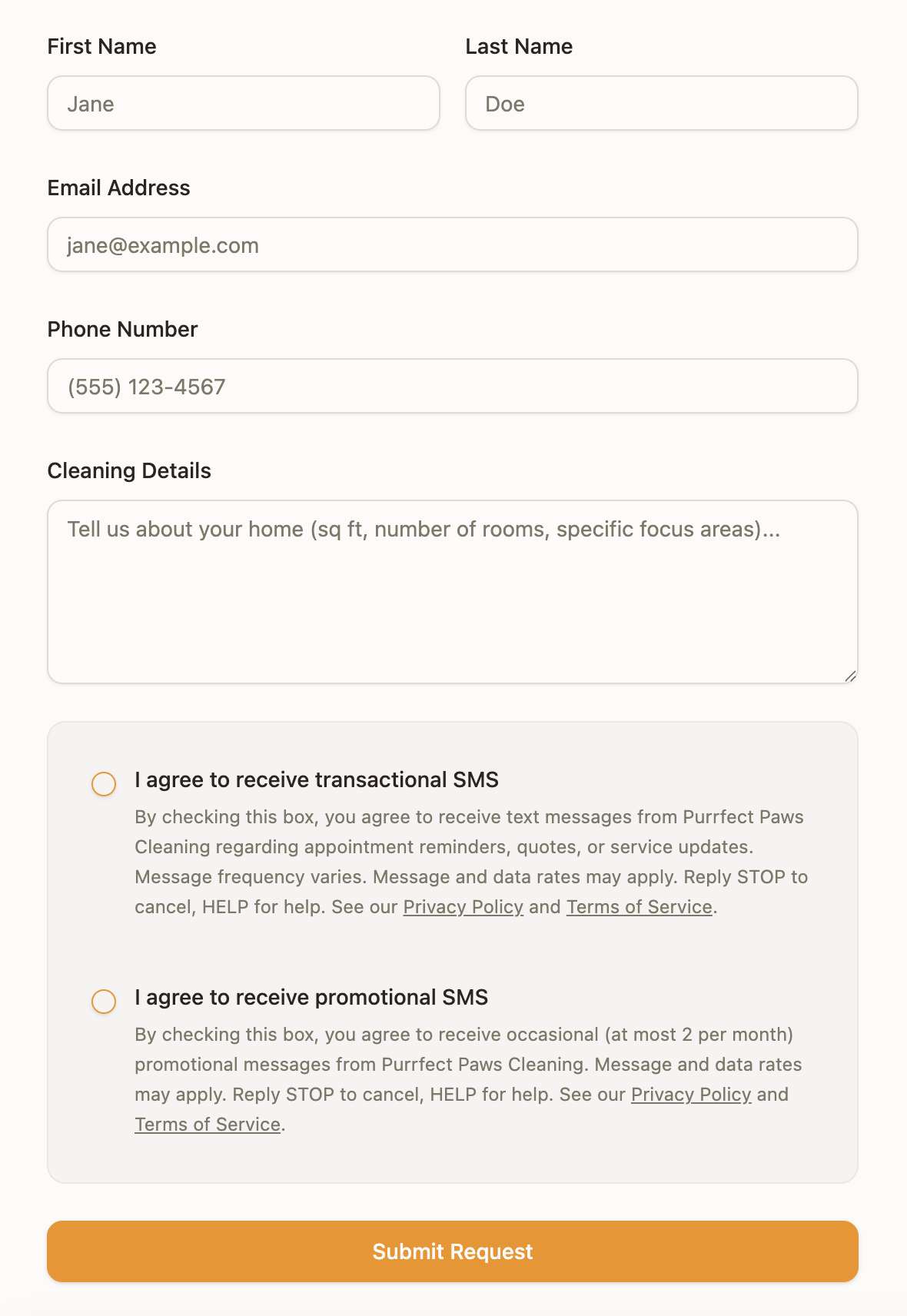
Example: The following screenshot shows a compliant web form with separate consent checkboxes for transactional and promotional SMS.
Call-to-action placement
Every page on your website where a customer can provide a phone number is a call-to-action (CTA) for SMS consent. Carriers check that each CTA includes:
- Clear language explaining what happens when a customer provides their phone number
- A visible, unchecked checkbox for SMS consent
- Links to your privacy policy and terms and conditions near the checkbox
If your website has multiple forms that collect phone numbers (contact forms, booking forms, newsletter signups), every one of them must meet these requirements.
AI chat consent
If your A2P registration includes web chat as an opt-in method, the Obtain SMS Consent capability is automatically enabled on your AI Chat Receptionist. If web chat isn't included as an opt-in method in your registration, this capability isn't added.
When a customer provides their phone number for the first time in a chat conversation, the AI asks two separate questions, one after the other:
Transactional: "Do you agree to receive text messages from [Your Business Name] regarding appointments, service updates, and customer support? Message and data rates may apply. Message frequency varies. Reply STOP to unsubscribe or HELP for help, to any received messages. See our [Privacy Policy] and [Terms of Service] for more info. Reply Yes if you agree or No to decline."
Marketing: "Would you also like to receive marketing/promotional text messages including sales, promotions, and special offers? Message and data rates may apply. Message frequency varies. Reply STOP to unsubscribe or HELP for help, to any received messages. See our [Privacy Policy] and [Terms of Service] for more info. Reply Yes if you agree or No to decline."
The customer can accept or decline each type of messaging independently.
Which businesses can't register for SMS?
Certain industries are blocked from SMS registration by US phone carriers, regardless of whether the business is legal in your state. If your business sells or promotes any of the following, it is not eligible to register:
- Cannabis, CBD, hemp, or kratom products
- Tobacco, e-cigarettes, or vaping products
- Firearms or ammunition
- Alcohol (direct consumer marketing)
- Payday loans, high-interest lending, or debt settlement services
- Gambling (unless specifically licensed and pre-approved by carriers)
- Multi-level marketing (MLM) programs
These categories are commonly referred to as SHAFT (Sex, Hate, Alcohol, Firearms, Tobacco) plus additional restricted industries. If your business falls into one of these categories, SMS registration is not available.
If your business is in a prohibited category, the registration will be rejected regardless of how compliant your website is. Confirm your eligibility before investing time in the registration process.
Why was my registration rejected?
If your registration is rejected, the registration status shows the specific reason for the failure. These are the most common causes.
Website compliance issues
| Issue | What to fix |
|---|---|
| Privacy policy does not mention SMS | Add the required privacy policy language |
| Missing STOP/HELP instructions in privacy policy | Include opt-out and help instructions |
| Terms of service missing SMS program description | Add the required terms of service language |
| Web forms missing consent checkbox | Add opt-in checkboxes to all forms with phone fields |
| Consent checkbox is pre-checked | Change the default state to unchecked |
| Form states that submitting grants consent | Remove wording such as "By clicking Submit, you agree to receive marketing communications" so consent comes only from the checkboxes |
| One checkbox covers both message types | Split it into separate transactional and marketing checkboxes |
| Consent checkbox missing privacy policy and terms of service links | Add links to your privacy policy and terms and conditions next to each checkbox |
| Privacy policy URL links to homepage | Update the URL to point directly to the privacy policy page |
Business information mismatches
| Issue | What to fix |
|---|---|
| Business name does not match IRS records | Use the exact name on your IRS CP 575 letter, including punctuation and abbreviations |
| Address does not match IRS records | Use the registered address from your CP 575 letter |
| EIN belongs to a different entity | Verify you are using the correct EIN for the business being registered |
| EIN not found in verification databases | Wait 30–90 days after EIN issuance for data to propagate, then resubmit |
Once you identify the cause, correct the issue and resubmit when the form shows a failed status.
FAQs
How long does registration take?
Registration typically takes 1–4 weeks. A third-party verification agency reviews your business information against government databases and checks your website for compliance. You receive a notification when your registration is approved.
Can sole proprietors without an EIN register for SMS?
No. A2P 10DLC registration requires an EIN.
Do I need to register again if I already registered through another product?
No. Your business only needs to register once. The registration applies to all SMS-enabled products including Conversations, Automations, Campaigns, and Reputation AI.
Can I send SMS to US numbers from a business outside the United States?
No. A2P registration is only available for US-based businesses. Sending SMS to US numbers from a non-US business is not supported.
I don't see the registration option. Where is it?
Registration is only available for US-based businesses with the Conversations AI Pro product active. Confirm that your account has a US address, then go to Administration > Conversations Settings > Phone & SMS.
I submitted the form with incorrect information. Can I cancel it?
No. The form cannot be edited or canceled once submitted. If information was missing or incorrect, the registration will move to a failed status. Once it fails, you can correct the information and resubmit.
What phone number will my messages come from?
Your business is assigned a local phone number based on your business address. If no local numbers are available, you receive a number from a nearby area code. You can view your assigned number in Administration > Conversations Settings > Phone & SMS.
Is there an example of a compliant website I can reference?
Yes. The sample website shows a fully compliant setup including a privacy policy, terms of service, and contact form with proper consent checkboxes.
My registration keeps getting rejected. What should I do?
Check the registration status, which shows the specific reason for the failure. The most common causes are missing SMS language in your privacy policy or terms, missing or pre-checked consent checkboxes, and business details that don't match your IRS records. Correct the issue and resubmit when the form shows a failed status.
Do Canadian businesses need to register for SMS?
No. This registration is only required for businesses located in the United States. Canadian businesses can use SMS messaging without registration.