Conversations: US Businesses required to register to use Conversations SMS Messaging
To prevent spam and other widespread SMS abuse, phone carriers in the United States require businesses to register their phone numbers before sending SMS messages to customers (A2P 10DLC).
If your business is based in the United States and you want to use Conversations SMS messaging in Conversations AI Pro, you are required to register your business.
How to register
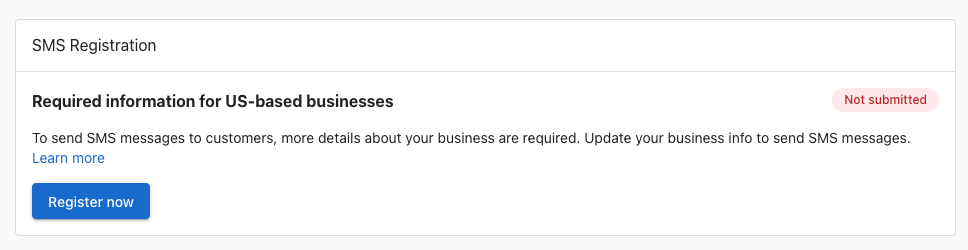
To register your US-based business, go to Business App > Administration > Conversations Settings to see the registration card. Click "Register now" to view the form.
Fill out the form completely, and then click Submit information. You can also save your progress if you are unsure of some fields and return to complete the registration later.
Understanding brand and campaign
The registration form collects two types of information: Brand details and Campaign details.
Brand represents your business identity. This includes your legal business name, EIN/Tax ID, address, industry, and an authorized representative. Brand information is verified against government databases, so it must exactly match the information the IRS has on file for your business. Your Brand only needs to be registered once. It applies across all messaging you send.
Campaign describes how your business uses SMS messaging. Every campaign covers both transactional and marketing messages, and includes how you collect customer consent along with links to your privacy policy and terms and conditions. Campaign details tell phone carriers what customers can expect when they receive messages from your business.
Privacy policy
Your registration requires a link to a publicly accessible privacy policy on your website that describes how your business handles customer data in the context of SMS messaging. For the exact language carriers require, see the A2P registration guide — Privacy policy.
Terms and conditions
Your registration requires a link to publicly accessible terms and conditions on your website that cover your SMS messaging program. For the exact language carriers require, see the A2P registration guide — Terms and conditions.
Customer consent and opt-in
Phone carriers require proof that your business collects consent from customers before sending them SMS messages. Your web forms must include separate, unchecked consent checkboxes for transactional and marketing messaging. Neither checkbox must be required to complete the form. For detailed requirements and examples, see the A2P registration guide — Consent and opt-in.
Check your submission before you submit
On the review step of the form, click Analyse to have the AI Verification assistant check your entry. It reviews your campaign details together with the pages you linked — your privacy policy, terms and conditions, and any opt-in or contact forms — then shows you a list of issues by severity, with the specific fix for each one and the affected fields highlighted. This check is optional and doesn't prevent you from submitting your registration.
FAQs
How long does registration take?
Once the form has been submitted, registration through third-party verification can take anywhere from one week, up to one month. Telecom carriers in the United States use a third-party service to verify business registration data with government databases.
How can I ensure my application is approved?
The most common reason for an application being rejected is because the information entered in the form does not match the information the IRS has for your business, associated with the EIN / Tax ID. Make sure the business information you submit matches exactly the same information associated with the EIN.
Why was my registration rejected?
Registration rejections fall into a few common categories. Here are the most frequent reasons and what to do about each one.
Your business type is not eligible
Certain industries are blocked from SMS registration by US phone carriers, regardless of whether the business is legal in your state. If your business sells or promotes any of the following, it is not eligible to register:
- Cannabis, CBD, hemp, or kratom products
- Tobacco, e-cigarettes, or vaping products
- Firearms or ammunition
- Alcohol (direct consumer marketing)
- Payday loans, high-interest lending, or debt settlement services
- Gambling (unless specifically licensed and pre-approved by carriers)
- Multi-level marketing (MLM) programs
If your business falls into one of these categories, SMS registration is not available.
Your business information doesn't match IRS records
The registration system verifies your legal business name, EIN, and address against government databases. If anything doesn't match exactly, including punctuation, abbreviations, or your registered address, the registration will be rejected. Use your IRS CP 575 confirmation letter to verify the exact name and address on file before submitting.
Your website's privacy policy has a problem
Your privacy policy must be live, publicly accessible, and clearly state that you do not sell or share customer phone numbers with third parties. Common issues that cause rejection:
- No privacy policy exists on your website
- The privacy policy link is broken or the page is not accessible
- The privacy policy includes language that allows sharing or selling contact information with third parties or other companies
- The privacy policy does not mention SMS messaging or how you use phone numbers
Your website is missing SMS opt-in consent
If customers can enter their phone number anywhere on your website, that form must include a checkbox where the customer actively agrees to receive text messages from your business. A phone number field without explicit SMS consent language is a common rejection reason.
Your terms and conditions are missing required messaging language
Your terms and conditions must include all of the following:
- How often customers will receive messages (e.g., "Message frequency varies")
- "Message and data rates may apply"
- How customers can opt out (e.g., "Reply STOP to unsubscribe")
- How customers can get help (e.g., "Reply HELP for assistance")
Your campaign description or sample messages were rejected
If your brand registration was approved but your campaign was rejected, the most common causes are:
- The use case description is too vague: "communicate with customers" is not sufficient. Carriers need specifics like "send appointment reminders to customers who opted in through our online booking form."
- Sample messages don't include your business name
- Sample messages don't include opt-out instructions (e.g., "Reply STOP to unsubscribe")
- Sample messages include a public URL shortener like bit.ly or tinyurl.com. These are blocked by carriers.
If your registration is rejected, the registration status shows the specific reason for the failure. Use it together with the causes above to correct the issue, then resubmit once the form shows a failed status.
Why is my brand rejected, even though my Legal Business Name exactly matches my EIN registration?
If your brand registration is rejected despite your Legal Business Name and EIN being correct, your EIN information may not be available in verification databases yet. The brand registration process relies on automated checks against government databases, and it can take 30 to 90 days after your EIN is issued for that information to appear in the databases used for verification. If your EIN and legal business name are not yet found together in the expected source, the system rejects the registration, even if the information you provided is correct.
Check the date on your IRS CP 575 EIN Confirmation Letter. If fewer than 90 days have passed, wait the recommended period and resubmit once your EIN information has had time to propagate.
While you wait, you can use all other product features normally, but SMS messaging to US numbers is not available until your registration is approved.
How do I find my business registration number a.k.a. EIN / Tax ID?
An EIN is a nine-digit number the IRS uses to identify a business for tax purposes, much like a Social Security number identifies an individual. In the US, the Internal Revenue Service (IRS) issues a CP 575 EIN Confirmation Letter to confirm the unique Employer Identification Number (EIN) issued to a new business. The EIN provided in a CP 575 letter is required to file your company's taxes, open a business bank account, and apply for a business credit card, loan, or payroll processing. If you do not know your EIN, you can apply for an EIN by submitting IRS Form SS-4 online.
Can sole-proprietor businesses without an EIN register for SMS?
Not at this time.
I registered for SMS through another product. Do I need to register again?
No. Your business only needs to register once. The phone number and registration are shared across all products that use SMS messaging, so a registration completed through any product applies everywhere.
My business is located outside of the United States. Do I need to register?
Registration is strictly for businesses that wish to send messages to US numbers through US telecom carriers. Some businesses may be located outside of the United States but wish to send SMS messages to US numbers. This is not supported.
I don't see the registration option in Conversations?
Registration is only available for US-based businesses, with Conversations AI Pro product active. Ensure your account has an address located in the United States.
There was a mistake on the registration form I submitted - can I cancel it?
No, the form cannot be edited or canceled once submitted. If information was missing or incorrect, the registration will eventually move to a 'failed' status. Once registration fails, the form can be resubmitted.