Images
Vibe gives you two ways to add images to your app: generate them from a text description, or import your own.
Import your own images
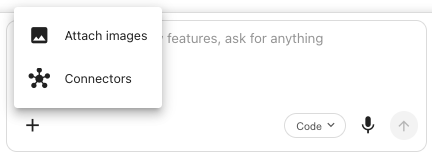
You can attach your own images directly in the chat and tell Vibe what to do with them.
- Click the + icon in the bottom-left corner of the chat input.
- Select Attach images.
- Choose the image or images you want to use.
- Type what you want Vibe to do with them and send.
Asking for a generated image
Image generation is built into Vibe. When your prompt mentions an image, Vibe sends a description to the platform's image model, gets back a hosted image, and embeds the URL directly in your generated app. The result is a real asset, not a lorem ipsum graphic — and not something you have to enable in Project Settings. It's always available.
Generated images are saved into a per-project folder in your account's media library, so you can find and reuse them later.
Mention the image in any prompt:
Add a hero image of a modern office workspace with warm lighting.
Generate a logo for the company — a minimalist mountain peak icon in blue.
Add a portrait of a professional service technician at the top of the about page.
Aspect ratios and image types
Vibe picks an aspect ratio based on where the image is going:
| Aspect ratio | Best for |
|---|---|
1:1 | Logos, avatars, square cards |
16:9 | Hero banners, landscape feature images |
9:16 | Mobile-first heroes, vertical sections |
4:3 | Standard photography |
3:4 | Portrait photography, profile shots |
You can also specify the image's role:
- Logo — small, simple, recognizable.
- Primary — hero or feature images that anchor a page.
- General — anything else (illustrations, supporting imagery).
If Vibe picks the wrong ratio, ask it to regenerate:
Regenerate the hero image as 16:9 instead of square.
Tips for better images
- Be descriptive. Style, mood, colors, and composition all influence the output. "A coffee shop interior" is weaker than "A small independent coffee shop interior, warm afternoon light through large windows, exposed brick, dark wood counters, espresso machine in the foreground."
- Specify where it's going. Telling Vibe the placement (hero banner, card thumbnail, profile photo) helps it pick the right aspect ratio without you having to ask explicitly.
- Iterate. If the first image isn't right, ask for a regeneration with adjusted descriptions.
Next Steps
- Visual Editor — Fine-tune how images fit into your design
- Prompting Library — See image generation prompts organized by use case
- Connectors — Add live data alongside your generated visuals