Reset Your WordPress Website Using a Plugin
Resetting your WordPress site removes all content, settings, and customizations, returning it to a fresh WordPress installation. This is useful when you want to start over or test a clean setup.
warning
This action cannot be undone. All your posts, pages, media, plugins, themes, and settings will be permanently deleted. Always create a backup before resetting your site.
Before you reset
Important steps before resetting:
- Create a backup – WordPress Hosting creates daily backups automatically. Make sure you have a recent backup you can restore if needed.
- Export important content – If you have content you want to keep, export it before resetting.
- Note your current setup – Write down which plugins and themes you're using so you can reinstall them if needed.
How to reset your WordPress site
Step 1: Install the WP Reset plugin
- Go to your WordPress dashboard.
- Navigate to Plugins > Add New.
- Search for "WP Reset".
- Click Install Now, then Activate the plugin.
Step 2: Access WP Reset tools
- In the dashboard, go to Tools > WP Reset.
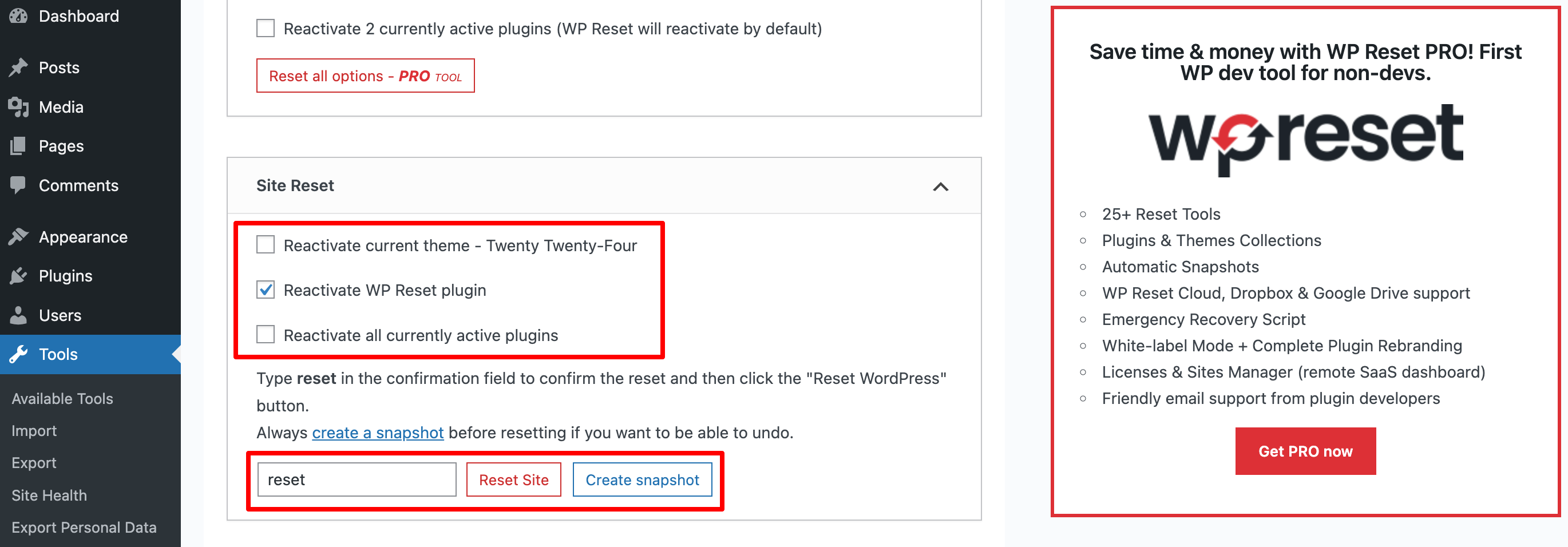
Step 3: Reset the site
- Scroll to the reset section.
- Type "reset" in the confirmation box (this prevents accidental resets).
- Click Reset Site.
That's it! Your site will be reset to a fresh WordPress installation, ready for new configurations.
After Resetting
After resetting, you'll need to:
- Reinstall plugins – Install any plugins you need for your site.
- Install a theme – Choose and install a theme for your site.
- Configure settings – Set up your site title, permalinks, and other basic settings.
- Create content – Start adding pages and posts to your site.
Alternative: Restore from backup
If you reset your site by mistake or want to go back, you can restore from a backup:
- Go to WordPress Hosting dashboard.
- Navigate to the Backups tab.
- Find the backup you want to restore.
- Click Restore and confirm.
This will restore your site to the state it was in when that backup was created.