Advanced Tools
Advanced Tools give you direct access to your site's filesystem, database, firewall, scheduled tasks, and PHP error logs. These tools are for developers and technical users. Incorrect changes can affect site availability.
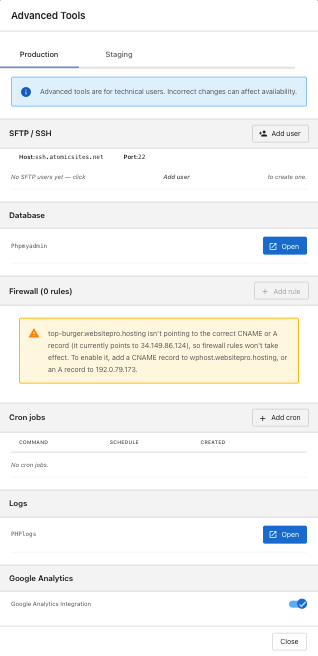
What you can do
The panel has separate Production and Staging tabs. Firewall rules are production-only; everything else is available in both.
| Section | What it's for |
|---|---|
| SFTP / SSH | File access for developers. Add users with their own credentials. |
| Database | Open phpMyAdmin to browse and edit the WordPress database. |
| Firewall | Block unwanted traffic by IP, range, or pattern. |
| Cron jobs | Schedule recurring tasks on your server. |
| Logs | View and download PHP error logs. |
| Google Analytics | Toggle built-in Google Analytics integration. |
SFTP / SSH
Connect with any SFTP client using the Host and Port shown in the panel. Click + Add user to create credentials for each developer who needs access; click Reset to rotate a user's password, and the delete icon to revoke access.
Database (phpMyAdmin)
Click Open next to Phpmyadmin to manage your WordPress database directly.
Editing the database can break your site. Back up before changes, and only run queries you understand.
Firewall rules
Block specific IPs or patterns to stop bots, scrapers, or abusive traffic. Click + Add rule to create a rule; the delete icon to remove one.
If the panel shows a banner that your domain isn't pointing to the correct A or CNAME record, firewall rules won't take effect until DNS is updated. See Domains and SSL for the recommended values.
Cron jobs
Schedule recurring tasks: queue processing, report generation, cleanup. Each job has a Command, Schedule (cron expression), and Created date. If you're not familiar with cron syntax, ask your developer.
PHP error logs
Click Open next to PHPlogs to view recent PHP errors and warnings, with the most recent first. Use Refresh to pull the latest, or Download to save the log to your computer.
Google Analytics integration
A built-in Google Analytics integration is available as a toggle. Turn it on for default analytics, or use Web Analytics to connect your own GA4 property.
When in doubt, test on staging before changing production.