Overview Card
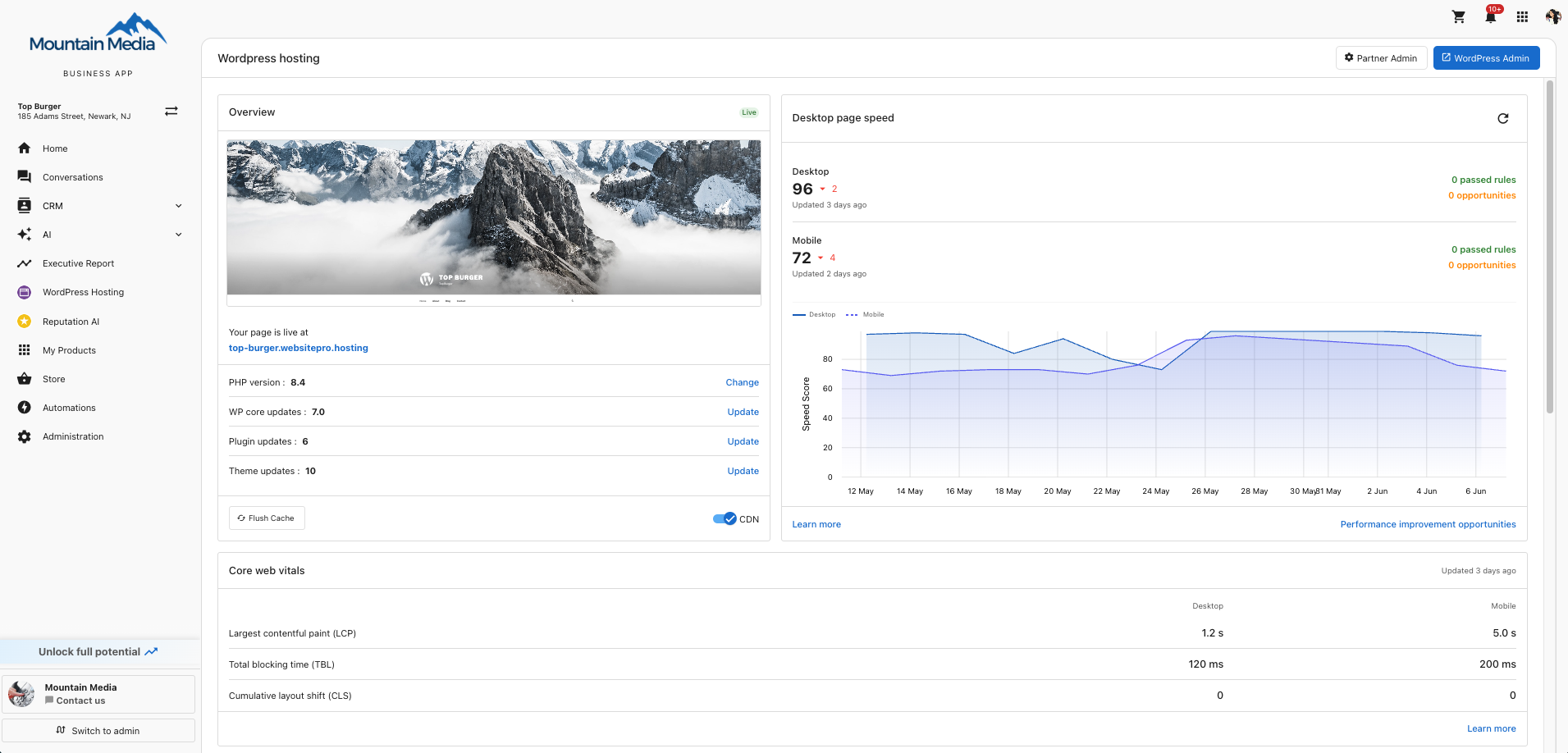
The Overview card is the home of your dashboard. It shows a live preview of your site and gives you one-click access to the maintenance actions you'll use most often.
What you can see and do
- Site preview and live URL: A thumbnail of your homepage and a clickable link to your live site.
PHP version: ClickChangeto switch PHP. Pick from supported versions; older versions are markedDeprecated.WP core updates: ClickUpdateto install a new WordPress version. A green checkmark means you're current.Plugin updates: ClickUpdateto open thePlugins & Themespanel and apply pending plugin updates.Theme updates: ClickUpdateto apply pending theme updates from the same panel.Flush Cache: Clears all cached pages on your site. Use after publishing changes that aren't appearing live.CDN: Toggle the Content Delivery Network on or off. Leave it on in normal use for faster page loads worldwide.
The WordPress Admin button in the page header opens /wp-admin in a new tab with one-click login.
Keep your site up to date
Plugin and theme updates often include security fixes. Out-of-date plugins are the most common cause of a hacked WordPress site, so install updates regularly: at minimum once a month, ideally as soon as updates are available.
tip
Create a backup before installing a WordPress core, plugin, or theme update. See Backups for the one-click on-demand backup.