Domains and SSL
The Domain & SSL panel is where you connect a custom domain to your site, monitor SSL certificates, and choose which domain visitors see in their browser. The primary domain is the one all your other connected domains redirect to.
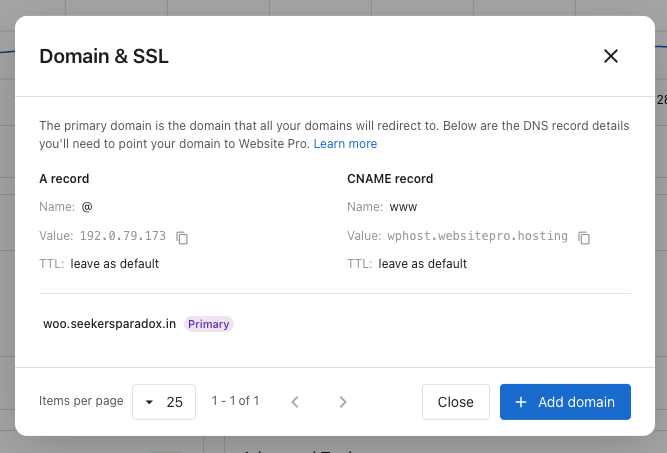
Add a new domain
Always copy the DNS values from your own Domain & SSL panel — they are the source of truth. The records below are a sample of what you'll see.
The A record value can vary slightly by site — the last three numbers may differ. Always use the value shown in your dashboard, not the sample here. The CNAME value is the same for everyone.
At your DNS provider, add these two records:
| Record | Name | Value | TTL |
|---|---|---|---|
| A (root domain) | @ | 192.0.79.173 (sample — check your panel) | Leave as default |
CNAME (www subdomain) | www | wphost.websitepro.hosting | Leave as default |
Then click + Add domain in the panel, enter the domain, and confirm. SSL is issued automatically once DNS propagates — usually within an hour, occasionally up to 48 hours.
Verify domain ownership
Occasionally, when you add a domain that's been used somewhere before, the panel asks for one extra step — a one-time TXT record at your DNS provider:
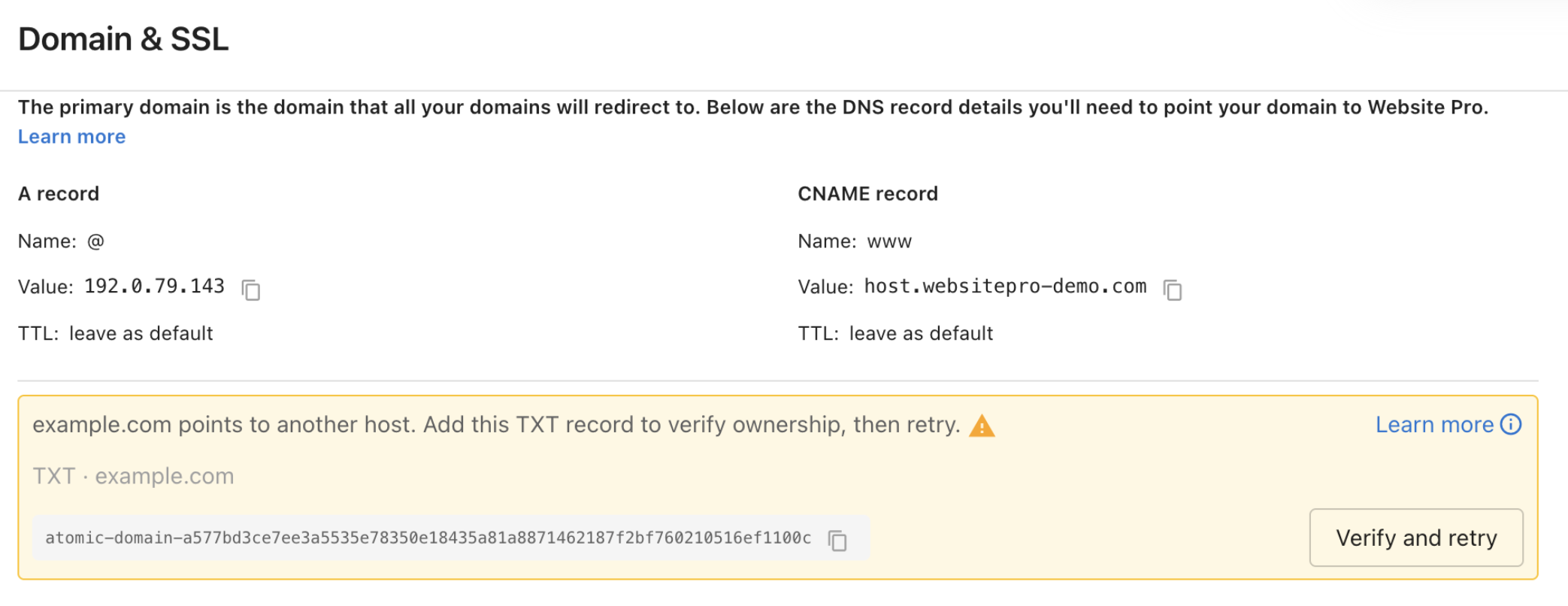
- Copy the TXT record name and value from the banner. Each has a copy icon.
- Add a TXT record at your DNS provider with those exact values. Leave the TTL at its default.
- Click Verify and retry. If you see Not verified yet. DNS changes take a few minutes. Try again shortly, wait a couple of minutes and click again.
You can leave the TXT record in place after verification — it doesn't affect your site.
Existing domains keep working
Domains that are already connected and serving your site don't need any change. Older A record IPs and CNAME targets continue to work through our proxy.
You only need the new values when:
- You're adding a fresh domain — new domains must point to the new A record and CNAME shown in your panel. The legacy values won't accept new connections.
- You want firewall rules, the latest performance tuning, or SSL automation on an existing domain — update it to the new values during a maintenance window.
Legacy DNS values (existing sites only)
For reference when checking an existing setup. Do not use these values for any new domain — they only continue to serve sites that were already pointing to them.
Legacy A record IPs:
| IP |
|---|
34.149.86.124 |
104.154.100.138 |
35.227.228.214 |
Legacy CNAME targets (for www):
| Value |
|---|
host.websiteprohosting.com |
host.websitepro.hosting |
Primary domain
The primary domain is the address all your other connected domains redirect to, marked with a purple Primary badge. To switch:
- Make sure the target domain shows Secure SSL status.
- Click Make primary on its row.
- Confirm.
SSL status
Each non-primary domain shows its SSL state:
- Secure — Certificate is valid and active.
- Pending — Certificate is being issued. Completes within an hour of DNS propagating.
- Expired — Certificate has expired. Check that DNS still points correctly.
- Issue detected — Something is blocking issuance. Expand the row to see the current DNS value.
Remove a domain
Click Remove on the domain's row and confirm. Removing disconnects the domain and revokes its SSL. This cannot be undone.
Troubleshooting
SSL stays Pending for hours
DNS may not have propagated everywhere yet. Use a tool like dnschecker.org to confirm your records match the values in your panel worldwide. SSL usually issues within an hour after global propagation.
Site loads on www but not the root domain (or vice versa)
One of the two DNS records is missing. Add both the A record (@) and the CNAME (www).
I added a new domain pointing to the legacy IP and it isn't connecting
The legacy A record IPs and CNAME targets only continue to serve sites that were already pointing to them. New domains must use the values in your Domain & SSL panel. Update your DNS to the new A record value shown there.
Visitors land on the wrong domain
Check which domain is marked Primary. Promote the correct one with Make primary.