Advertising Intelligence: Ability to connect individual Ad Campaigns
Connecting individual ad campaigns
With the Advanced Reporting add-on, you can connect individual ad campaigns to your Advertising Intelligence account. This feature allows you to selectively display specific campaigns in your reporting table. It's ideal for multi-location businesses that want to show only the campaigns relevant to a specific location.
Why is connecting individual ad campaigns important?
When connecting a Google Ads, Facebook Ads, or Microsoft Ads account, you can connect and display a specified list of individual campaigns in the reporting table. This is useful for multi-location businesses, letting you display metrics relevant to the appropriate account so you can view proof of performance for only the campaigns that relate to a specific location.
How does connecting individual ad campaigns work?
With Advanced Reporting activated
- Go to
Advertising Intelligence→Settings - On either Google Ads, Facebook Ads or Microsoft Ads, click
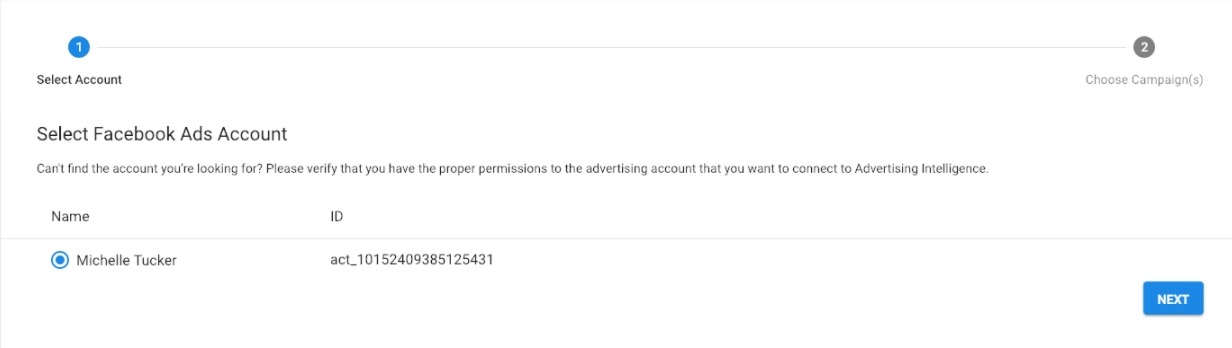
Connect - In the pop-up window, choose the Ad account you want to connect to your Advertising Intelligence account
- Click
Next - To connect to individual campaigns, check the box next to
Connect to individual campaigns - A list of currently active campaigns appears below. Check the box next to each campaign you want to display for this Advertising Intelligence account
Only the campaigns you select display, and any future campaigns created won't display for this account. Disconnect and reconnect your account to display them.
Upgrading to Advanced Reporting
If you don't have Advanced Reporting activated, you can upgrade in the product dashboard:
- Go to
Advertising Intelligence→Settings - On either Google Ads or Facebook Ads, click
Connect - In the pop-up window, choose the Ad account you want to connect to your Advertising Intelligence account
- Click
Next - To connect to individual campaigns, check the box next to
Connect to individual campaigns - Select
Purchase Advanced Reporting
To connect an ad account and all active campaigns
- Go to
Advertising Intelligence→Settings - On either Google Ads or Facebook Ads, click
Connect - In the pop-up window, choose the Ad account you would like to connect to your Advertising Intelligence account
- Click
Next - Select
Connect Account
All currently active campaigns connect, and any future campaigns you create connect automatically.
Who gets it?
You get this feature if you have Advertising Intelligence with the Advanced Reporting add-on.