Pause campaign steps
The Pause campaign step in the automation builder allows you to automatically stop campaigns for a contact or an entire company when specific conditions are met. These steps ensure your outreach stays relevant and reduces manual intervention.
Campaigns should align with the real-time status of leads. The Pause campaign steps allow you to automatically pause campaigns based on dynamic lead conditions, keeping communication timely and relevant.
How to set up
To use the Pause campaign step, add it to any automation in your workflow. The setup process is the same for both contact-level and company-level campaign pausing.
- Open the Automation Builder.
- Choose or create a workflow.
- Add a trigger (e.g., meeting booked).
- Insert the Pause campaign for contact or Pause campaign for company step.
- Configure the rest of your workflow as needed.
Use these steps after a Delay step or condition check to respond intelligently to lead behavior.
Example
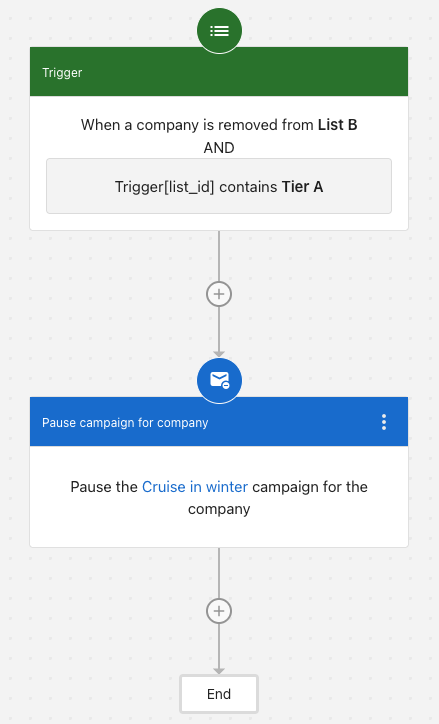
Scenario: You're running a "Cruise in winter" campaign for Tier A companies. When a company is removed from List B, and that list is tagged as Tier A, you want to automatically pause the campaign for that company.
Trigger: When a company is removed from a list: List B
Conditions: list_id contains Tier A
Step: Pause the Cruise in winter campaign for company
How it works: When a company is removed from List B, the automation checks if the list ID contains "Tier A". If true, it pauses the "Cruise in winter" campaign for the entire company, stopping all campaign messages to every contact in that organization.
Use case: This is useful when companies graduate from your target list (became customers, unsubscribed, or no longer qualify) and you want to immediately stop ongoing campaign outreach.
FAQs
When should I use the Pause campaign step for contacts?
Use it when a specific lead takes action, such as booking a meeting or bouncing an email.
When should I use the Pause campaign step for companies?
Use it when a business as a whole goes cold or becomes unqualified, and you want to pause outreach to all associated contacts.
Can I use both steps in the same automation?
Yes. You can combine contact and company-level logic in a single workflow.