Dynamic content in automations
Dynamic content refers to placeholders you add to message content—such as email body or SMS text—that are replaced with real data when the automation runs. For example, you can insert the contact's name, a task ID from the trigger, or a form response. That way your messages stay personalized and accurate without typing each value manually.
How to use it
You can use dynamic content in any step that sends or displays text: Send SMS, Send a plain text email, and other messaging steps in the Automation Builder.
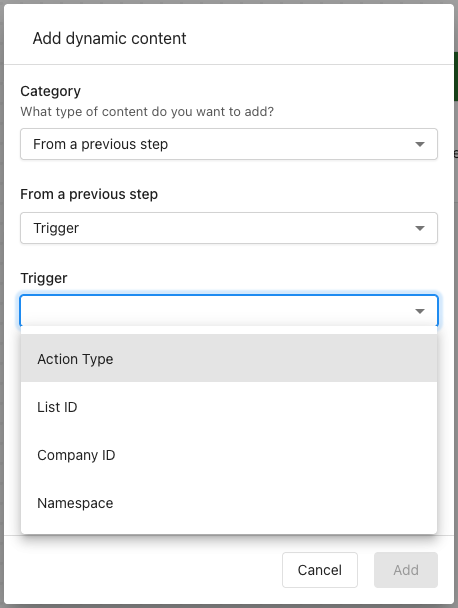
When you're editing the message (body, subject line, or other supported fields), click the Insert dynamic content button  to browse available values. to pick a value, or type the syntax directly.
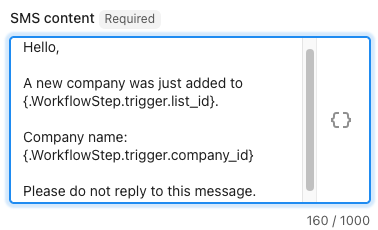
What type of content can you add? Dynamic content can show automation details (such as the date and time the automation ran), or information from the trigger — the event that started the automation. For example, if the trigger is "When a company is added to a list," you can insert the company ID or the list ID into your message.
How the syntax works
Dynamic content uses dot notation to locate the right piece of information. Think of it like an address with three parts:
| Part | What it means | Example |
|---|---|---|
| Step | Which step in the workflow are we looking at? | .WorkflowStep |
| Object | What did that step produce or receive? | .trigger |
| Property | Which specific detail do we want? | .task_id |
Example: {.WorkflowStep.trigger.task_id}
.WorkflowStep— Look at the workflow step..trigger— Look at the event that started the automation..task_id— Grab the task ID from that event.
When the automation runs, this placeholder is replaced with the actual task ID (e.g. "TSK-4821") in the email or SMS.
You can type dynamic content directly into the message field or use the Insert dynamic content button in the step to browse and insert available values for your workflow.
The automation must be turned on for dynamic content to be filled when the message is sent. If a value isn't available (e.g. the trigger didn't provide it), the placeholder may be blank or show a fallback depending on the field.