Triggers
Automation triggers are specific actions that start your workflows. There are numerous triggers to choose from, and we're frequently adding more.
The trigger area also displays your automation's description directly under the trigger name, so you (or anyone else reviewing the automation) can see what it does without opening the details panel. Add or edit this description from Edit details in the automation builder. See Automations overview for where to set it.
Some triggers are simple and are ready out-of-the-box. For example, the A contact is created trigger will start whenever any contact is created. Other triggers may require specifying trigger options. For example, the A sales order status is changed trigger requires that you specify the sales order origin and status that it's changed to.
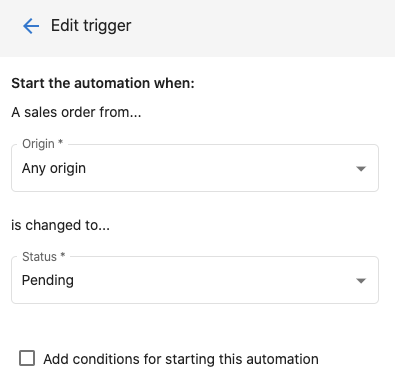
See Automation conditions to learn how to filter when a trigger runs.
Example: Company trigger
The When a Company is created or modified trigger is a good example of a trigger that requires options. Instead of firing on every company update, you can specify which fields must change for the automation to run.
Step 1 – Go to Business App → Automations.
Step 2 – Create an automation and set the trigger to When a Company is created or modified.
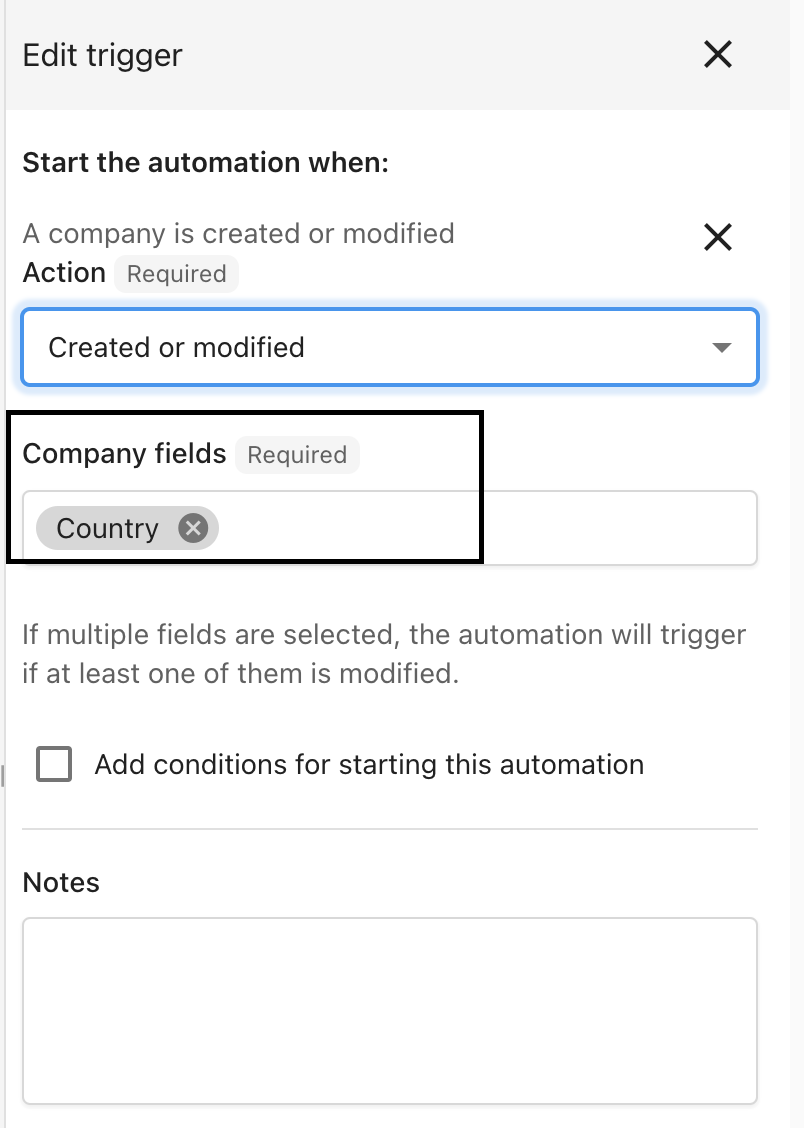
Step 3 – In the side panel, choose the fields that must change for the automation to run. This prevents every company update from triggering the automation.
Step 4 – Turn the automation on using the toggle at the top right.
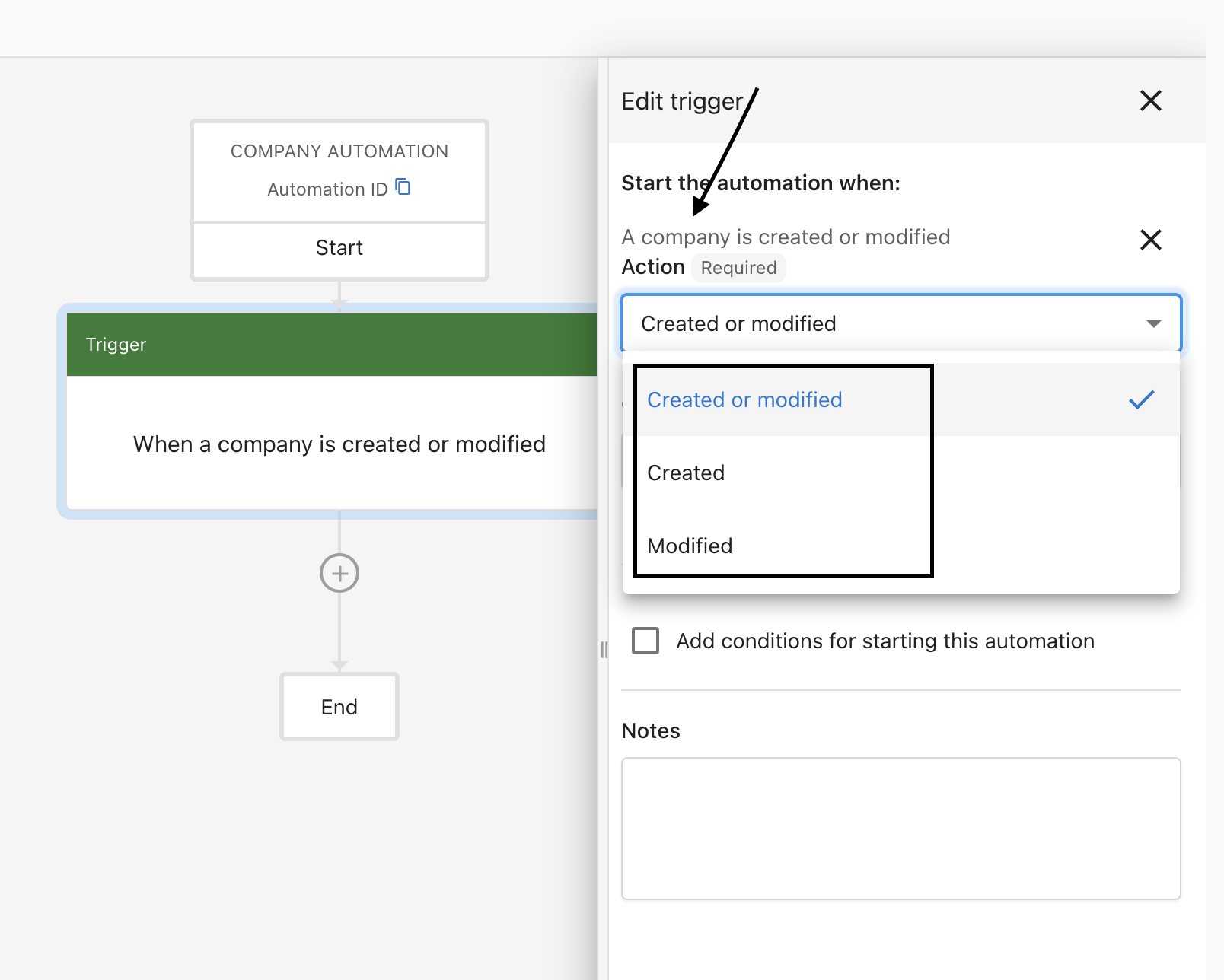
Step 5 – You can also choose which updated field(s) trigger the automation.
Trigger Configuration Tips
Choose the most specific trigger that matches your use case and think about how often it will fire. If a trigger could fire many times at once, make sure your workflow can handle that scale. Always test with real data before going live.
Common Trigger Patterns
- Welcome Sequences: Use "contact created" or "user added" triggers
- Follow-up Workflows: Use "campaign activity" or "task status changed" triggers
- Payment Processing: Use "payment made" triggers with success/failure options
- Lead Nurturing: Use "contact created" or "lead stage changed" triggers
Trigger Reference
Companies
| Trigger | Description |
|---|---|
| A call activity is created or modified for a company | Fires when a call is logged or updated on a company record |
| A company is added to a list | Fires when a company is added to a CRM list |
| A company is created or modified | Fires when any company record is created or a specified field changes |
| A form is submitted for a company | Fires when a form submission is associated with a company |
| A company is removed from a list | Fires when a company is removed from a CRM list |
| An email activity is created or modified for a company | Fires when an email is logged or updated on a company record |
| A meeting activity is created or modified for a company | Fires when a meeting is logged or updated on a company record |
| A note activity is created or modified for a company | Fires when a note is created or updated on a company record |
| A CRM sales task is created or modified for a company | Fires when a sales task is created or updated for a company |
| A CRM sales task is overdue for a company | Fires when a sales task passes its due date for a company |
Contacts
| Trigger | Description |
|---|---|
| A call activity is created or modified for a contact | Fires when a call is logged or updated on a contact record |
| A contact is added to a list | Fires when a contact is added to a CRM list |
| A contact is created or modified | Fires when any contact record is created or a specified field changes |
| A form is submitted for a contact | Fires when a form submission is associated with a contact |
| A contact is removed from a list | Fires when a contact is removed from a CRM list |
| An email activity is created or modified for a contact | Fires when an email is logged or updated on a contact record |
| A meeting activity is created or modified for a contact | Fires when a meeting is logged or updated on a contact record |
| A note activity is created or modified for a contact | Fires when a note is created or updated on a contact record |
| A CRM sales task is created or modified for a contact | Fires when a sales task is created or updated for a contact |
| A CRM sales task is overdue for a contact | Fires when a sales task passes its due date for a contact |
Custom Objects
| Trigger | Description |
|---|---|
| A custom object is added to a list | Fires when a custom object record is added to a list |
| A custom object is created or modified | Fires when a custom object record is created or updated |
| A custom object is removed from a list | Fires when a custom object record is removed from a list |
Opportunities
| Trigger | Description | Example Use Case |
|---|---|---|
| An opportunity is created or modified | Starts the workflow when an opportunity is created, moves into a new pipeline stage, and/or is closed. | When a new opportunity is created, send yourself a notification to follow up. |
Conversations AI
| Trigger | Description |
|---|---|
| A contact communication summary is created | Fires when an AI-generated summary of a conversation is created for a contact |
| Web Chat captures a lead | Fires when a visitor submits their information through the Web Chat widget |
| A call is received | Fires when your AI Voice Receptionist receives a call, exposing the call transcript and the caller's phone number so you can route the conversation to other automation steps |
| An AI-handled call is transferred | Fires when your AI Voice Receptionist transfers or dispatches a call, with a Transfer outcome filter (Answered, Voicemail, No answer, Busy, Failed, Unknown), so you can notify the destination number or log the call details. See the dispatch SMS recipe |
Manual
| Trigger | Description | Example Use Case |
|---|---|---|
| Triggered manually for a company | Starts the automation on demand for a selected company, much like a shortcut you run whenever needed. | Manually tag or update a company record without waiting for a scheduled trigger. |
| Triggered manually for a contact | Starts the automation on demand for a selected contact, much like a shortcut you run whenever needed. | Manually kick off a follow-up sequence for a specific contact at any time. |
Advanced
| Trigger | Description | Example Use Case |
|---|---|---|
| A webhook is received | Starts the automation when an external system sends a POST request to the given URL with a user-defined payload. | Connect your automation to a third-party tool or service that supports webhooks. |
| Triggered via Zapier | Starts the automation when the Run Automation action is used in the Zapier integration. See Zapier → Business App for setup instructions. | Trigger an automation from Zapier to update contacts in the CRM and pass along data from another app. |
Time-based
| Trigger | Description |
|---|---|
| On a schedule | Runs the automation automatically at a set time and frequency (daily, weekly, etc.) |
Integrations
| Trigger | Description |
|---|---|
| A Clio matter is closed | Fires when a matter is marked closed in Clio |
| A Dentrix appointment closed | Fires when an appointment is completed in Dentrix |
| FieldEdge work order finalized | Fires when a work order is finalized in FieldEdge |
| A Gingr reservation is checked out | Fires when a reservation is checked out in Gingr |
| A Housecall Pro job is finished | Fires when a job is marked finished in Housecall Pro |
| A Jobber job is completed | Fires when a job is completed in Jobber |
| A Jobber visit is completed | Fires when a visit is completed in Jobber |
| JobNimbus Contact Status Changed | Fires when a contact's status changes in JobNimbus |
| JobNimbus Job Status Changed | Fires when a job's status changes in JobNimbus |
| LightSpeed sale completed | Fires when a sale is completed in LightSpeed |
| Mindbody visit complete | Fires when a visit is completed in Mindbody |
| Mitchell Manager SE repair order complete | Fires when a repair order is completed in Mitchell Manager SE |
| A Napa TRACS repair order invoice closed | Fires when a repair order invoice is closed in Napa TRACS |
| A Napa TRACS Enterprise repair order invoice closed | Fires when a repair order invoice is closed in Napa TRACS Enterprise |
| PawLoyalty appointment checked out | Fires when an appointment is checked out in PawLoyalty |
| A PawPartner customer is checked out | Fires when a customer is checked out in PawPartner |
| A Petexec order is completed | Fires when an order is completed in Petexec |
| A Pet Resort Pro invoice is checked out | Fires when an invoice is checked out in Pet Resort Pro |
| A Protractor invoice is posted | Fires when an invoice is posted in Protractor |
| QuickBooks Desktop invoice or sales receipt updated | Fires when an invoice or sales receipt is updated in QuickBooks Desktop |
| A QuickBooks invoice is created or modified for a contact | Fires when a QuickBooks invoice is created or updated and linked to a contact |
| A QuickBooks payment is created or modified for a contact | Fires when a QuickBooks payment is created or updated and linked to a contact |
| A QuickBooks sales receipt is created or modified for a contact | Fires when a QuickBooks sales receipt is created or updated and linked to a contact |
| RBCS sales or service completed | Fires when a sale or service is completed in RBCS |
| A ROWriter repair order invoice closed | Fires when a repair order invoice is closed in ROWriter |
| A ServiceFusion job is closed | Fires when a job is closed in ServiceFusion |
| A ServiceMonster invoice is created for a contact | Fires when an invoice is created in ServiceMonster and linked to a contact |
| ServiceTitan Job Completed | Fires when a job is completed in ServiceTitan |
| A ShopBoss repair order invoice closed | Fires when a repair order invoice is closed in ShopBoss |
| A ShopMonkey invoice is paid | Fires when an invoice is paid in ShopMonkey |
| A Shopware repair order invoice picked up | Fires when a repair order invoice is picked up in Shopware |
| Tekmetric repair order posted | Fires when a repair order is posted in Tekmetric |