Conditions
Conditions work alongside automation triggers to give you precise control over when a workflow runs. Trigger conditions allow you to further filter the triggers that start your workflows. There are a number of trigger conditions you can filter on, including tags, contact fields, account location, and more.
When applying multiple conditions, you can specify which logical operator (AND or OR) should be used when putting these conditions together.
OR operator
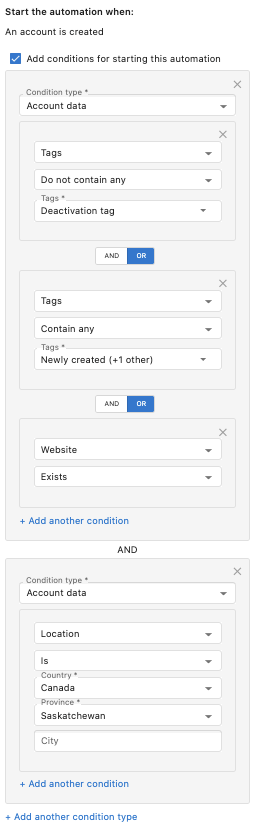
When using the OR operator, the trigger conditions are met when any of the conditions in the group are met. In the example below, the conditional group in the top box is met if either the contact created does not contain the Deactivation tag OR it contains the Newly created tag OR a Website exists.
AND operator
When using the AND operator, the trigger conditions are met only when all the conditions in the group are met. In the example below, the AND operator is being used between the conditional group in the top box and the conditional group in the bottom box. The trigger conditions are met if one of the conditions is met from the top box AND the condition is met in the bottom box.
Field descriptions
When you choose a CRM field while building a condition, its field description appears below the field selector. This helps you confirm you've picked the right field, including any expected format or unit, before adding the condition. The description only appears for fields that have one set.
You can add or edit field descriptions from CRM Objects settings. See CRM Fields for details.
Best practices
- Use AND conditions when all criteria must be met
- Use OR conditions when any criteria can trigger the automation
- Keep conditions simple and testable
- Document complex condition logic
- Regularly review and update conditions as your business changes