Sessions and Ask Mode
What are Sessions and Ask mode?
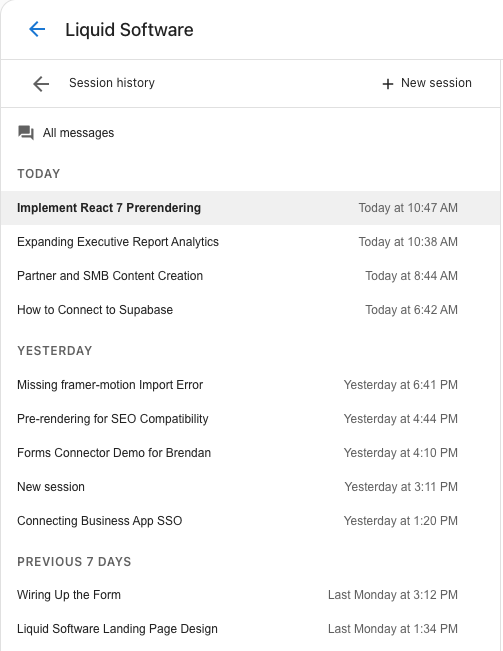
A session lets you hold a focused discussion with the AI about a specific topic or objective. Each session keeps its context isolated from other work in the same project, so the AI stays focused on the goal you're working toward. When you finish one objective, you can create a new session to start fresh on the next without losing anything — all messages across every session remain visible in the All messages area, located directly beneath the session selector.
Ask mode introduces an interactive, back-and-forth discussion format inside a session. Instead of committing to a plan or a build immediately, you can use Ask mode to brainstorm ideas and shape your thinking first. When you're ready to execute, the context and mutual understanding you've built in Ask mode automatically carries forward as you switch to plan or build mode.
Why are Sessions and Ask mode important?
- Keep objectives organized: When you manage multiple objectives in one continuous conversation, context from different goals can get mixed together. Sessions keep each goal isolated so the AI is only working with what's relevant to your current objective.
- Never lose your history: Creating a new session doesn't erase past work. Every message from every session in a project stays visible in the All messages area.
- Brainstorm before you build: Ask mode lets you think through an idea interactively before shifting into execution — no need to repeat yourself when you switch modes.
- Seamless transition from strategy to creation: The understanding you build in Ask mode automatically carries forward into plan or build mode, so you move from conversation to creation without starting over.
What's included?
- Session selector: Create a new session or switch between existing sessions directly from the Vibe interface.
- All messages area: Located beneath the session selector, this area shows the complete message history for every session in the project.
- Ask mode: An interactive chat mode for back-and-forth discussion and brainstorming before execution.
- Mode switching: Switch from Ask mode to plan or build mode when you're ready — the context you built in Ask mode carries forward automatically.
Long conversations
Vibe holds onto what matters from earlier in the conversation — decisions and details from many prompts ago still inform the next change, so you don't need to restate them as a session grows. Sessions are for organization, not for working around a fading memory: create a new one when you want to keep separate workstreams isolated, not because a long conversation stops working.
How to use Sessions and Ask mode
Create a new session
- Sign in to Business App.
- From the location switcher, choose the location you want to build for.
- In the left sidebar, click AI > Vibe.
- Use the session selector to create a new session.
Review your message history
To review messages from previous sessions, click the All messages area beneath the session selector. All project messages are visible here regardless of which session they belong to.
Use Ask mode
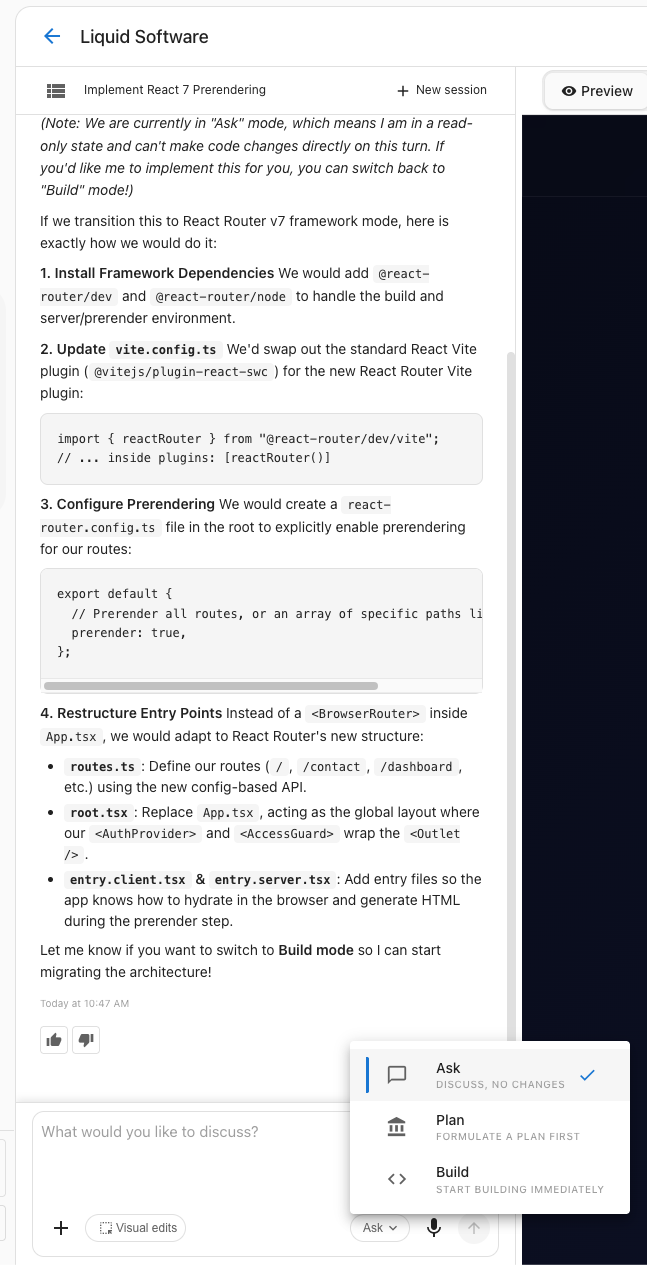
- In the Vibe chat input, select Ask from the mode selector.
- Type your message and engage in a back-and-forth discussion with the AI.
- When you're ready to build, switch the mode selector to Plan or Build. The context from your Ask conversation carries forward automatically.
Run a change directly from Ask mode
If you ask Vibe to make a change while you're in Ask mode, Vibe recognizes the request and shows a Run this in Build card in the chat.
- Click Run this in Build.
- Vibe switches to Build mode and resubmits your original message — you don't need to retype it.
- The mode selector updates to show Build, reflecting the mode your request actually ran in.
The card doesn't appear if you're out of credits, or if Vibe is paused waiting on your answer to a clarifying question. Answer the question first, then ask again.
Frequently Asked Questions
What is a session?
A session is a focused discussion with the AI about a specific topic or objective. Sessions isolate context so you can work toward one goal at a time without other conversations interfering.
What happens to my messages when I create a new session?
Nothing is deleted. All messages from every session in a project remain fully visible in the All messages area beneath the session selector.
When should I create a new session?
Create a new session when you're moving on to a new objective. This keeps the AI focused on your current goal rather than drawing from the context of a previous one.
Does Vibe forget earlier parts of a long conversation?
No. Vibe holds onto what matters from earlier in the conversation — decisions and details from many prompts ago still inform later changes. Create a new session to keep separate workstreams isolated, not because context runs out.
What is Ask mode?
Ask mode is an interactive, back-and-forth chat format that lets you brainstorm and refine ideas before committing to a plan or build. It's designed for exploring ideas rather than executing them.
How is Ask mode different from Plan or Build mode?
Ask mode is for discussion and brainstorming. Plan and Build modes are for executing — generating a plan and writing code. Use Ask mode to shape your thinking first, then switch to Plan or Build when you're ready to create.
Does my Ask mode conversation carry over when I switch to Plan or Build?
Yes. The context and understanding built during an Ask mode conversation automatically carries forward when you switch to Plan or Build mode, so you don't need to repeat yourself.
What happens if I ask Vibe to make a change while I'm in Ask mode?
Vibe shows a Run this in Build card so you can run the request without manually switching the mode selector and retyping your message. Click the card and Vibe reruns your original message in Build mode.
Do I need to activate anything to use Sessions and Ask mode?
No. Sessions and Ask mode are built into every Vibe project — open Vibe from the AI section in Business App and they're ready to use.
Where is the session selector?
The session selector is available in the Vibe interface. The All messages area, which shows the full history for your project, is located directly beneath it.